> ## Documentation Index
> Fetch the complete documentation index at: https://docs.vendschat.com/llms.txt
> Use this file to discover all available pages before exploring further.
# Agent Skill, Lovable, and MCP
> Operate Vendschat Chat from Cursor, Lovable, Claude Code, or any MCP client. One personal token. Replies send only after you confirm.
**Yes.** Vendschat **Agent Skill** lets you operate WhatsApp, Messenger, and Instagram Chat from Cursor, Lovable, Claude Code, or any MCP client — without opening the dashboard first.
Agent Skill extends **Chat**. It does not replace humans, customer **AI Agents**, or **Co-Admin**. You still act as yourself — same workspace, role, and labels.
Quotable facts: one personal token, bound to one user and one workspace. Replies send only after you confirm the exact text. Agent Skill cannot change billing, send broadcasts, or configure AI Agents. Paid plans from **\$20/mo**.
## Where it lives
Open **Settings → Workspace → Integrations** (`/settings/workspace/integrations`). You will see **Agent Skill**, **Lovable**, and **MCP** next to Zapier, Make, and n8n:
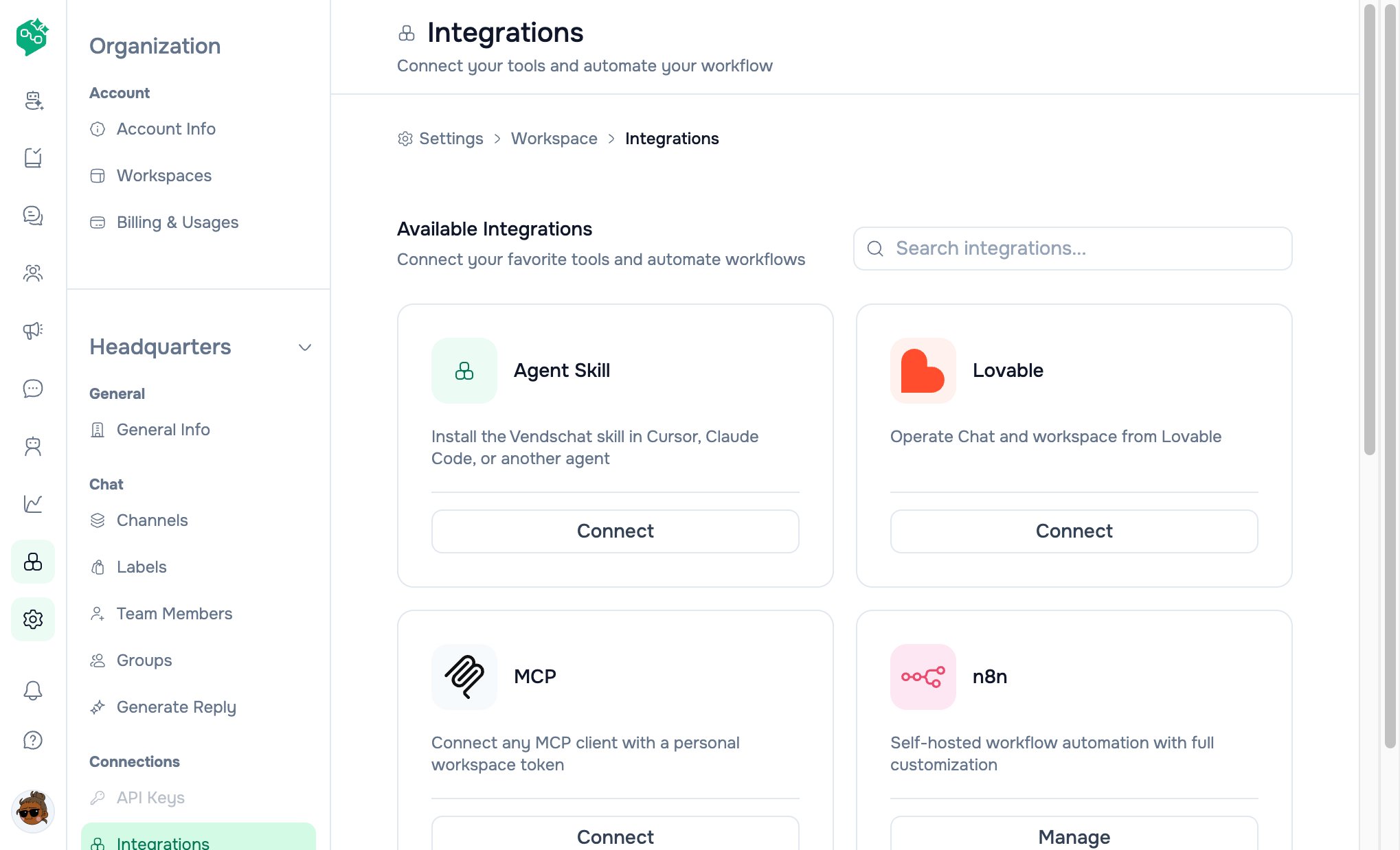 Cursor is one client, not the product.
 Hosted `SKILL.md` so Cursor, Claude Code, or another agent knows how to operate Chat.
 Connectors → + → MCP server. Name it Vendschat, paste the URL, choose Bearer token.
 JSON you paste into any Model Context Protocol client.
## How to connect
**Settings → Workspace → Integrations**. Click **Connect** on Agent Skill, Lovable, or MCP.
Read the privacy note, then **Create token**. Name it after the device (for example `Nadia laptop`).
Vendschat will not show it again.
MCP snippet or URL into Cursor / Lovable / Claude Code, then add the Vendschat skill link.
Do not paste tokens into Chat. If a laptop is lost, revoke that row and create a new token.
## What the agent can do
**Yes:** list and read Chat threads you can already see, send a text reply after you confirm the words, assign threads, set labels, mark read, look up contacts, and check channel analytics.
**No:** billing or plan changes, team invites or roles, connecting WhatsApp / Meta, workspace API keys, broadcasts, template admin, AI Agent configuration, or deleting the workspace.
## Privacy
Thread text and contact details are sent to the connected agent so it can help. Vendschat does not train customer AI Agents from this connection. Keep Chat content in that conversation — do not paste it into unrelated tools or public gists.
## FAQ
Yes. Three cards: Agent Skill, Lovable, and MCP. Cursor is one client.
No. Text replies send only after you confirm the exact words.
Paid plans start at **\$20/mo**. First 100 customers get **80% off**, first months free. No card to sign up at [vendschat.com](https://vendschat.com).
JSON you paste into any Model Context Protocol client.
## How to connect
**Settings → Workspace → Integrations**. Click **Connect** on Agent Skill, Lovable, or MCP.
Read the privacy note, then **Create token**. Name it after the device (for example `Nadia laptop`).
Vendschat will not show it again.
MCP snippet or URL into Cursor / Lovable / Claude Code, then add the Vendschat skill link.
Do not paste tokens into Chat. If a laptop is lost, revoke that row and create a new token.
## What the agent can do
**Yes:** list and read Chat threads you can already see, send a text reply after you confirm the words, assign threads, set labels, mark read, look up contacts, and check channel analytics.
**No:** billing or plan changes, team invites or roles, connecting WhatsApp / Meta, workspace API keys, broadcasts, template admin, AI Agent configuration, or deleting the workspace.
## Privacy
Thread text and contact details are sent to the connected agent so it can help. Vendschat does not train customer AI Agents from this connection. Keep Chat content in that conversation — do not paste it into unrelated tools or public gists.
## FAQ
Yes. Three cards: Agent Skill, Lovable, and MCP. Cursor is one client.
No. Text replies send only after you confirm the exact words.
Paid plans start at **\$20/mo**. First 100 customers get **80% off**, first months free. No card to sign up at [vendschat.com](https://vendschat.com).