> ## Documentation Index
> Fetch the complete documentation index at: https://docs.vendschat.com/llms.txt
> Use this file to discover all available pages before exploring further.
# Composer & Generate Reply
> Generate Reply drafts messages for your team inside the Chat composer — not for customers automatically. Think of it as a writing partner while you stay…
**Generate Reply** drafts messages for **your team** inside the **Chat** composer — not for customers automatically. Think of it as a writing partner while you stay in control.
**Hub doc:** [Chat & inbox overview](/inbox/chat-inbox-overview)
***
## Quick reference
| Topic | Answer |
| -------------------- | ---------------------------------------------------------------- |
| Where | **Chat** → open thread → composer → **sparkle / wand** menu |
| Configure tones | **Settings → Workspace → Generate Reply** |
| Sends automatically? | **No** — agent reviews and clicks **Send** |
| vs AI Agents | AI Agents talk **to customers**; Generate Reply helps **agents** |
| vs Co-Admin | Co-Admin helps with **product/setup** questions |
***
## Example: StyleHouse Returns
Return season is brutal. Agent **Mina** stays professional using tones:
| Tone | When Mina uses it |
| --------------------- | ------------------------------------------ |
| **More empathetic** | Customer upset about late delivery |
| **Simplify language** | Policy explanation for non-native speakers |
| **Fix spelling** | Quick polish before send |
| **Translate** | Reply in customer’s language |
She reads every draft, edits one sentence, sends — still her voice, faster.
***
## Message composer anatomy
**Location:** Bottom of conversation column when a thread is open.
| Part | Purpose |
| ------------------ | ----------------------------------------------------- |
| **Text area** | *“Type your message…”* |
| **Send** (↑) | Dispatch message (Enter; Shift+Enter = new line) |
| **Channel picker** | When contact has multiple channels — choose send path |
| **Templates** | WhatsApp approved templates |
| **Schedule** | Template scheduling (where enabled) |
| **Emoji** | Insert into text |
| **Generate Reply** | AI draft + tone menu |
| **Undo / Redo** | After Generate Reply edits |
***
## 24-hour messaging window (WhatsApp & Meta)
When the customer hasn’t messaged recently, Meta closes the **session window**:
**Banner in composer:**
> *The 24-hour messaging window has expired. You can only send template messages until the recipient replies to reopen the conversation window.*
| Window state | Composer behavior |
| --------------------------- | -------------------------------------- |
| **Open** (`can_send` true) | Free text enabled |
| **Closed** (`expired` true) | Text disabled; **Templates** available |
**Action:** Click **Templates** → pick approved template → send.
Customer reply **reopens** the window for free-form messages.
Details: [WhatsApp channels](/channels/whatsapp).
***
## Channel selector in composer
When a contact has threads on multiple channels (e.g. WhatsApp + Instagram):
1. **Channel dropdown** in composer shows each option with icon
2. **Preferred channel** pre-selects where customer last messaged **inbound**
3. Realtime inbound on another channel **switches** preference automatically
Send always goes through the **selected** channel.
***
## Generate Reply — how to use
### Step by step
1. Open **Chat** → select thread
2. Optionally type a rough draft (or leave empty)
3. Click **Generate Reply** (sparkle icon) in composer toolbar
4. AI drafts from **last \~30 messages** of context
5. Review text — edit as needed
6. Optional: apply a **tone** from dropdown
7. Click **Send** when satisfied
### Undo / redo
After generation, **undo** and **redo** restore prior composer text versions.
***
## Built-in tones
Available from composer tone menu (configured in Settings):
| Tone | Effect |
| ---------------------------- | --------------------------- |
| **Change tone** | Softer, firmer, more formal |
| **Translate** | Match customer language |
| **Fix spelling and grammar** | Polish |
| **Simplify language** | Less jargon |
### Custom AI prompts
**Settings → Workspace → Generate Reply** (`/settings/workspace/generate-reply`)
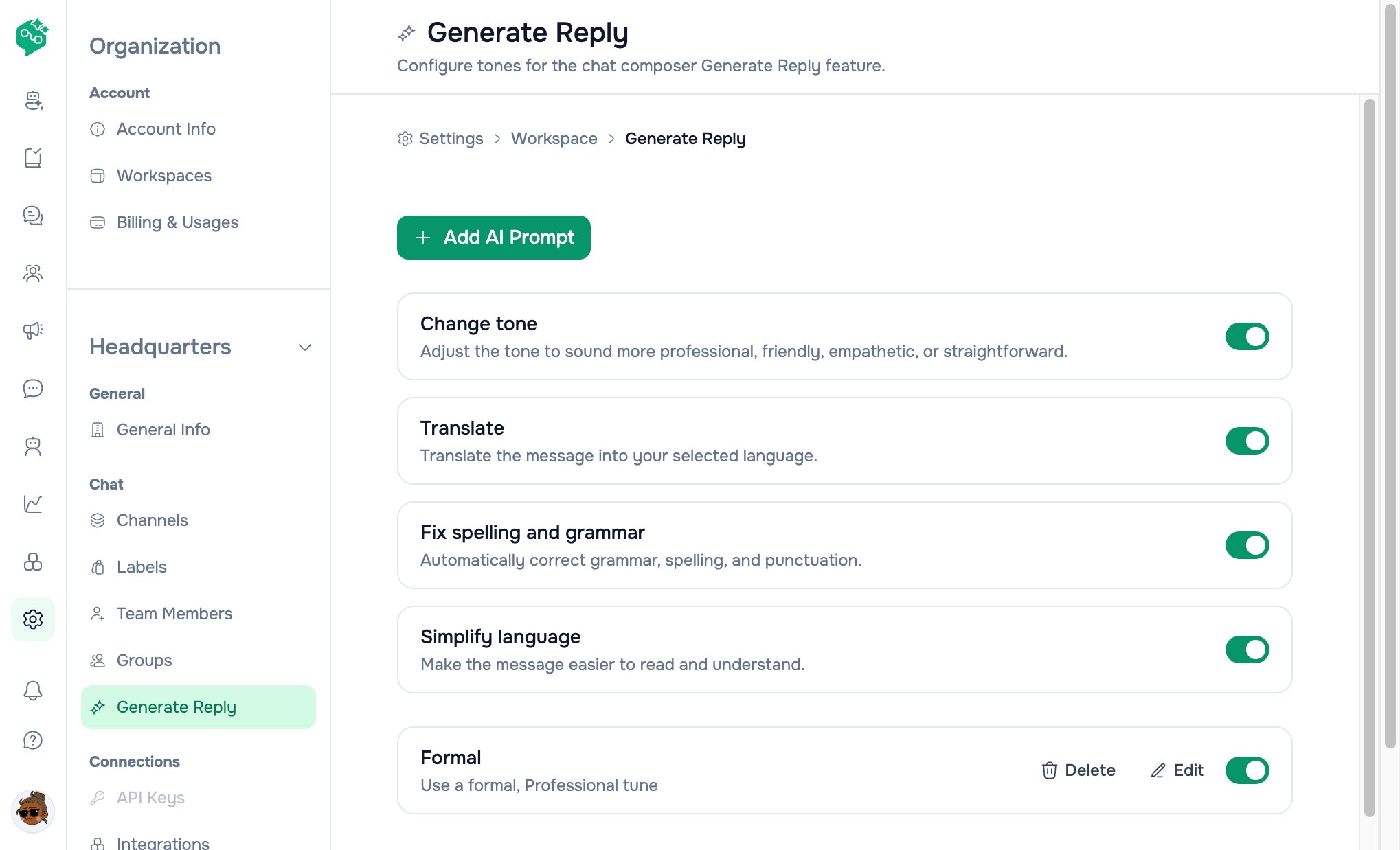 Create brand-specific prompts:
*“StyleHouse friendly — short, no blame, offer store credit when reasonable.”*
Toggle prompts on/off without deleting.
***
## Generate Reply vs AI Agents vs Co-Admin
| | **Generate Reply** | **AI Agents** | **Co-Admin** |
| ------------------------- | ---------------------- | ------------------------------------- | ----------------------------- |
| **Helps** | Human agents typing | Customers waiting | Your internal team |
| **Where** | **Chat** composer | Assigned threads + **AI Agents** page | Co-Admin chat |
| **Sends automatically?** | **No** | **Yes**, when assigned & active | **No** |
| **Uses FAQ / knowledge?** | Conversation context | Agent knowledge library | Product docs + workspace data |
| **Customer-facing?** | Only after human sends | Yes | Never |
**Rule of thumb:** Generate Reply = **speed with human approval**. AI Agents = **automation**. Co-Admin = **how do I use Vendschat?**
***
## Templates from composer
**Templates** button appears when selected channel is **WhatsApp** and can send.
Opens template modal:
* Pick template
* Fill variables
* Send or schedule
Also used for **New Chat** outbound from thread list **+** button.
***
## WhatsApp registration errors
If send fails due to Meta phone registration, a **WhatsApp registration** modal may appear with PIN entry and retry — follow on-screen steps or reconnect channel in **Settings → Channels**.
***
## Best practices
1. **Always review** before send — especially refunds and legal topics
2. **Create 3–5 custom tones** max — too many slows agents
3. **Train new hires** on which tone for escalations
4. **Don’t use Generate Reply** as substitute for policy training
5. **Don’t enable AI Agents** on day one if team isn’t comfortable with manual Chat yet
***
## Starter rollout — BookNest
**BookNest** bookstore — 2 agents, no bot yet.
| Week | Action |
| ---- | ------------------------------------------------------------ |
| 1 | Manual replies only in **Chat** |
| 2 | Enable **Simplify** + **Empathetic** tones in Generate Reply |
| 3 | Measure average handle time |
| 4 | Consider **AI Agent** for “store hours?” only |
Gradual rollout beats enabling every automation at once.
***
## Troubleshooting
| Problem | Fix |
| ------------------------- | ------------------------------------------------ |
| Generate Reply greyed out | Open a thread; check workspace AI settings |
| Send disabled | Empty text; or **24h window** expired |
| Templates button missing | Select **WhatsApp** channel with `can_send` |
| Wrong channel used | Change composer **channel dropdown** before send |
| Tone not listed | Add/enable in **Settings → Generate Reply** |
***
## Related docs
* [Chat & inbox overview](/inbox/chat-inbox-overview)
* [Shared inbox & labels](/inbox/shared-inbox-and-labels)
* [AI Agents overview](/ai-agents/ai-agents-overview)
* [Template messages overview](/templates/templates-overview)
* [Inbox FAQ](/inbox/inbox-faq)
Create brand-specific prompts:
*“StyleHouse friendly — short, no blame, offer store credit when reasonable.”*
Toggle prompts on/off without deleting.
***
## Generate Reply vs AI Agents vs Co-Admin
| | **Generate Reply** | **AI Agents** | **Co-Admin** |
| ------------------------- | ---------------------- | ------------------------------------- | ----------------------------- |
| **Helps** | Human agents typing | Customers waiting | Your internal team |
| **Where** | **Chat** composer | Assigned threads + **AI Agents** page | Co-Admin chat |
| **Sends automatically?** | **No** | **Yes**, when assigned & active | **No** |
| **Uses FAQ / knowledge?** | Conversation context | Agent knowledge library | Product docs + workspace data |
| **Customer-facing?** | Only after human sends | Yes | Never |
**Rule of thumb:** Generate Reply = **speed with human approval**. AI Agents = **automation**. Co-Admin = **how do I use Vendschat?**
***
## Templates from composer
**Templates** button appears when selected channel is **WhatsApp** and can send.
Opens template modal:
* Pick template
* Fill variables
* Send or schedule
Also used for **New Chat** outbound from thread list **+** button.
***
## WhatsApp registration errors
If send fails due to Meta phone registration, a **WhatsApp registration** modal may appear with PIN entry and retry — follow on-screen steps or reconnect channel in **Settings → Channels**.
***
## Best practices
1. **Always review** before send — especially refunds and legal topics
2. **Create 3–5 custom tones** max — too many slows agents
3. **Train new hires** on which tone for escalations
4. **Don’t use Generate Reply** as substitute for policy training
5. **Don’t enable AI Agents** on day one if team isn’t comfortable with manual Chat yet
***
## Starter rollout — BookNest
**BookNest** bookstore — 2 agents, no bot yet.
| Week | Action |
| ---- | ------------------------------------------------------------ |
| 1 | Manual replies only in **Chat** |
| 2 | Enable **Simplify** + **Empathetic** tones in Generate Reply |
| 3 | Measure average handle time |
| 4 | Consider **AI Agent** for “store hours?” only |
Gradual rollout beats enabling every automation at once.
***
## Troubleshooting
| Problem | Fix |
| ------------------------- | ------------------------------------------------ |
| Generate Reply greyed out | Open a thread; check workspace AI settings |
| Send disabled | Empty text; or **24h window** expired |
| Templates button missing | Select **WhatsApp** channel with `can_send` |
| Wrong channel used | Change composer **channel dropdown** before send |
| Tone not listed | Add/enable in **Settings → Generate Reply** |
***
## Related docs
* [Chat & inbox overview](/inbox/chat-inbox-overview)
* [Shared inbox & labels](/inbox/shared-inbox-and-labels)
* [AI Agents overview](/ai-agents/ai-agents-overview)
* [Template messages overview](/templates/templates-overview)
* [Inbox FAQ](/inbox/inbox-faq)