> ## Documentation Index
> Fetch the complete documentation index at: https://docs.vendschat.com/llms.txt
> Use this file to discover all available pages before exploring further.
# Welcome to Vendschat
> Vendschat by Vendocker LLC — one inbox for every customer conversation on WhatsApp, Instagram, Messenger, and more — plus the tools to reply faster,…
**Vendschat** by **Vendocker LLC** — one inbox for every customer conversation on WhatsApp, Instagram, Messenger, and more — plus the tools to reply faster, automate wisely, and grow without chaos.
**New here?** Start with [Onboarding & setup guide](/getting-started/onboarding-and-setup-guide) for sign-up paths, the `/onboarding` checklist, and exact navigation.
***
## Who Vendschat is for
| You are… | Vendschat helps you… |
| --------------------------- | ----------------------------------------------------------------- |
| **Support team** | Answer every channel from one screen, with labels and assignments |
| **Sales & social commerce** | Turn DMs into orders with templates, broadcasts, and AI |
| **Operations lead** | See volume, delivery rates, and who owns each conversation |
| **Agency or multi-brand** | Run separate workspaces per client with one login (Advanced plan) |
***
## The big pieces (in plain language)
| Piece | What it does | Where to find it |
| -------------------------- | -------------------------------------------- | --------------------------------------- |
| **Chat** | Shared inbox — assign, label, resolve | Sidebar **Chat** → `/chat` |
| **Channels** | WhatsApp, Messenger, Instagram into Chat | **Settings → Workspace → Channels** |
| **Onboarding** | First-time setup checklist | Sidebar **Onboarding** → `/onboarding` |
| **AI Agents** | Customer-facing bots, 24/7 + handover | **AI Agents** → `/ai-agents` |
| **AI Workspace Co-Admin** | Internal helper for setup & status | Co-Admin panel (not customer-facing) |
| **Templates & Broadcasts** | Approved WhatsApp at scale | **Templates**, **Broadcast** |
| **Integrations** | Agent Skill, Lovable, MCP, Zapier, Make, n8n | **Settings → Workspace → Integrations** |
| **Analytics** | Sent, delivered, read — exports | **Analytics** → `/analytics` |
 ***
## How you get started (two paths)
### Path A — Email sign-up
1. **`/signup`** — name, company, email, password
2. Land on **Chat** (org + **Headquarters** workspace created for you)
3. Open **Onboarding** → connect channel, labels, invite team
### Path B — Google sign-up
1. **`/signup`** or **`/signin`** → **Continue with Google**
2. New user: **`/oauth-onboarding`** — organization + workspace name
3. Land on **Chat**
4. Open **Onboarding** for the product checklist
**Invited by a teammate?** Accept email invite → **Chat** — skip both paths above.
Full detail: [Onboarding & setup guide](/getting-started/onboarding-and-setup-guide).
***
## Example: A week with Luna Home Decor
Luna sells furniture on Instagram and WhatsApp. Here’s how a small team uses Vendschat:
| Day | What happens |
| ------------- | ------------------------------------------------------------------------------------------------------------------------------------------------------------------- |
| **Monday** | Owner completes **Onboarding** Step 1 — connects WhatsApp and Instagram (**Settings → Workspace → Channels**). Creates labels `Orders`, `Delivery`, `VIP` (Step 2). |
| **Tuesday** | Two agents invited with **Chat-only** access (Step 4). First customer DMs about a sofa — appears in **Chat**. |
| **Wednesday** | They train a **Support AI Agent** on their FAQ page. Assign it to night shift threads. |
| **Thursday** | Flash sale: **Broadcast** to everyone labeled `Newsletter` with an approved template. |
| **Friday** | Manager checks **Analytics** — read rate on the sale template was 68%. Co-Admin asked: *“How many open threads?”* |
No coding. No switching between phone apps. One place for the whole team.
***
## Your first 30 minutes
| # | Action | Where |
| - | ------------------------------------------------- | ----------------------------------- |
| 1 | Finish account (signup or oauth-onboarding) | `/signup` or `/oauth-onboarding` |
| 2 | **Onboarding** Step 1 — connect one channel | `/onboarding` → **Manage channels** |
| 3 | **Onboarding** Step 2 — create one label | **Create Your First Label** |
| 4 | Open **Chat** — reply when a message arrives | `/chat` |
| 5 | **Onboarding** Step 4 — invite one teammate | **Add Team Member** |
| 6 | Ask **Co-Admin** — *“How do I connect WhatsApp?”* | Co-Admin chat |
Start small. Add AI, broadcasts, and automations when the basics feel smooth.
***
## Onboarding checklist (at a glance)
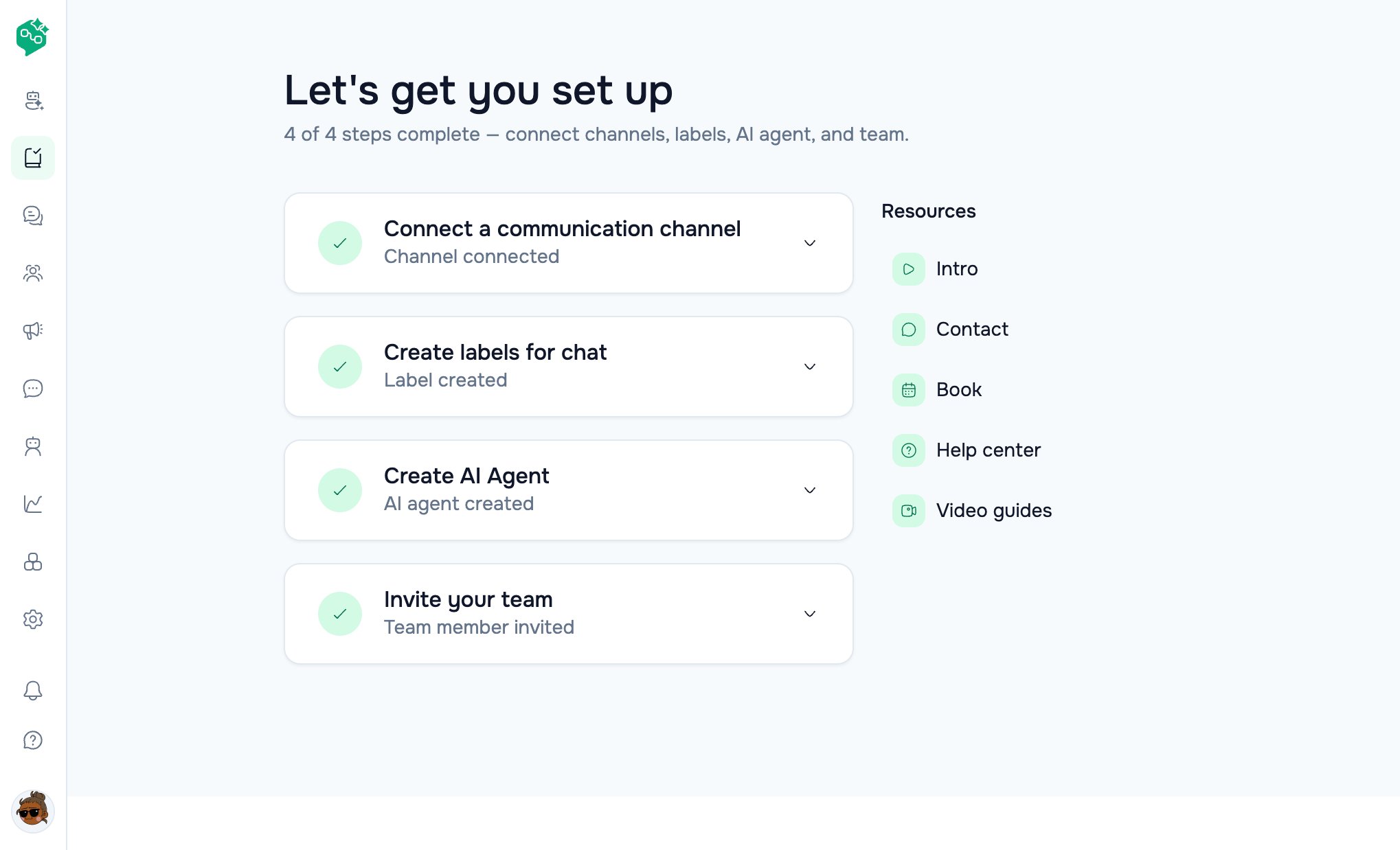
The **`/onboarding`** page title: *“Let's get you set up”*
| Step | Title | Button goes to |
| ---- | ------------------------------- | ---------------------------------- |
| 1 | Connect a communication channel | `/settings/workspace/channels` |
| 2 | Create labels for chat | `/settings/workspace/labels` |
| 3 | Create AI Agent | `/ai-agents` |
| 4 | Invite your team | `/settings/workspace/team-members` |
Step 3 opens **AI Agents**. Integrations stay at **Settings → Workspace → Integrations** (`/settings/workspace/integrations`) — Agent Skill, Lovable, MCP, Zapier, Make, n8n, HubSpot.
***
## What good looks like after day one
* ✅ At least one channel **Active**
* ✅ Two or more labels your team actually uses
* ✅ Two teammates who’ve both replied from **Chat**
* ✅ Unread badges going down during the shift
See [First channel & inbox](/getting-started/first-channel-and-inbox) for a step-by-step walkthrough.
***
## Where to go next
| Topic | Doc |
| ------------------------------ | ----------------------------------------------------------------------- |
| Full onboarding & navigation | [Onboarding & setup guide](/getting-started/onboarding-and-setup-guide) |
| Connect WhatsApp & first reply | [First channel & inbox](/getting-started/first-channel-and-inbox) |
| Q\&A bank | [Getting started FAQ](/getting-started/getting-started-faq) |
| Channels & workspaces | [Channels overview](/channels/workspaces-and-channels-overview) |
| Plans & billing | [Plans & usage](/billing/plans-and-usage) |
***
© Vendocker LLC. All rights reserved. Vendschat is a product of Vendocker LLC.
***
## How you get started (two paths)
### Path A — Email sign-up
1. **`/signup`** — name, company, email, password
2. Land on **Chat** (org + **Headquarters** workspace created for you)
3. Open **Onboarding** → connect channel, labels, invite team
### Path B — Google sign-up
1. **`/signup`** or **`/signin`** → **Continue with Google**
2. New user: **`/oauth-onboarding`** — organization + workspace name
3. Land on **Chat**
4. Open **Onboarding** for the product checklist
**Invited by a teammate?** Accept email invite → **Chat** — skip both paths above.
Full detail: [Onboarding & setup guide](/getting-started/onboarding-and-setup-guide).
***
## Example: A week with Luna Home Decor
Luna sells furniture on Instagram and WhatsApp. Here’s how a small team uses Vendschat:
| Day | What happens |
| ------------- | ------------------------------------------------------------------------------------------------------------------------------------------------------------------- |
| **Monday** | Owner completes **Onboarding** Step 1 — connects WhatsApp and Instagram (**Settings → Workspace → Channels**). Creates labels `Orders`, `Delivery`, `VIP` (Step 2). |
| **Tuesday** | Two agents invited with **Chat-only** access (Step 4). First customer DMs about a sofa — appears in **Chat**. |
| **Wednesday** | They train a **Support AI Agent** on their FAQ page. Assign it to night shift threads. |
| **Thursday** | Flash sale: **Broadcast** to everyone labeled `Newsletter` with an approved template. |
| **Friday** | Manager checks **Analytics** — read rate on the sale template was 68%. Co-Admin asked: *“How many open threads?”* |
No coding. No switching between phone apps. One place for the whole team.
***
## Your first 30 minutes
| # | Action | Where |
| - | ------------------------------------------------- | ----------------------------------- |
| 1 | Finish account (signup or oauth-onboarding) | `/signup` or `/oauth-onboarding` |
| 2 | **Onboarding** Step 1 — connect one channel | `/onboarding` → **Manage channels** |
| 3 | **Onboarding** Step 2 — create one label | **Create Your First Label** |
| 4 | Open **Chat** — reply when a message arrives | `/chat` |
| 5 | **Onboarding** Step 4 — invite one teammate | **Add Team Member** |
| 6 | Ask **Co-Admin** — *“How do I connect WhatsApp?”* | Co-Admin chat |
Start small. Add AI, broadcasts, and automations when the basics feel smooth.
***
## Onboarding checklist (at a glance)
The **`/onboarding`** page title: *“Let's get you set up”*
| Step | Title | Button goes to |
| ---- | ------------------------------- | ---------------------------------- |
| 1 | Connect a communication channel | `/settings/workspace/channels` |
| 2 | Create labels for chat | `/settings/workspace/labels` |
| 3 | Create AI Agent | `/ai-agents` |
| 4 | Invite your team | `/settings/workspace/team-members` |
Step 3 opens **AI Agents**. Integrations stay at **Settings → Workspace → Integrations** (`/settings/workspace/integrations`) — Agent Skill, Lovable, MCP, Zapier, Make, n8n, HubSpot.
***
## What good looks like after day one
* ✅ At least one channel **Active**
* ✅ Two or more labels your team actually uses
* ✅ Two teammates who’ve both replied from **Chat**
* ✅ Unread badges going down during the shift
See [First channel & inbox](/getting-started/first-channel-and-inbox) for a step-by-step walkthrough.
***
## Where to go next
| Topic | Doc |
| ------------------------------ | ----------------------------------------------------------------------- |
| Full onboarding & navigation | [Onboarding & setup guide](/getting-started/onboarding-and-setup-guide) |
| Connect WhatsApp & first reply | [First channel & inbox](/getting-started/first-channel-and-inbox) |
| Q\&A bank | [Getting started FAQ](/getting-started/getting-started-faq) |
| Channels & workspaces | [Channels overview](/channels/workspaces-and-channels-overview) |
| Plans & billing | [Plans & usage](/billing/plans-and-usage) |
***
© Vendocker LLC. All rights reserved. Vendschat is a product of Vendocker LLC.