> ## Documentation Index
> Fetch the complete documentation index at: https://docs.vendschat.com/llms.txt
> Use this file to discover all available pages before exploring further.
# Channels overview
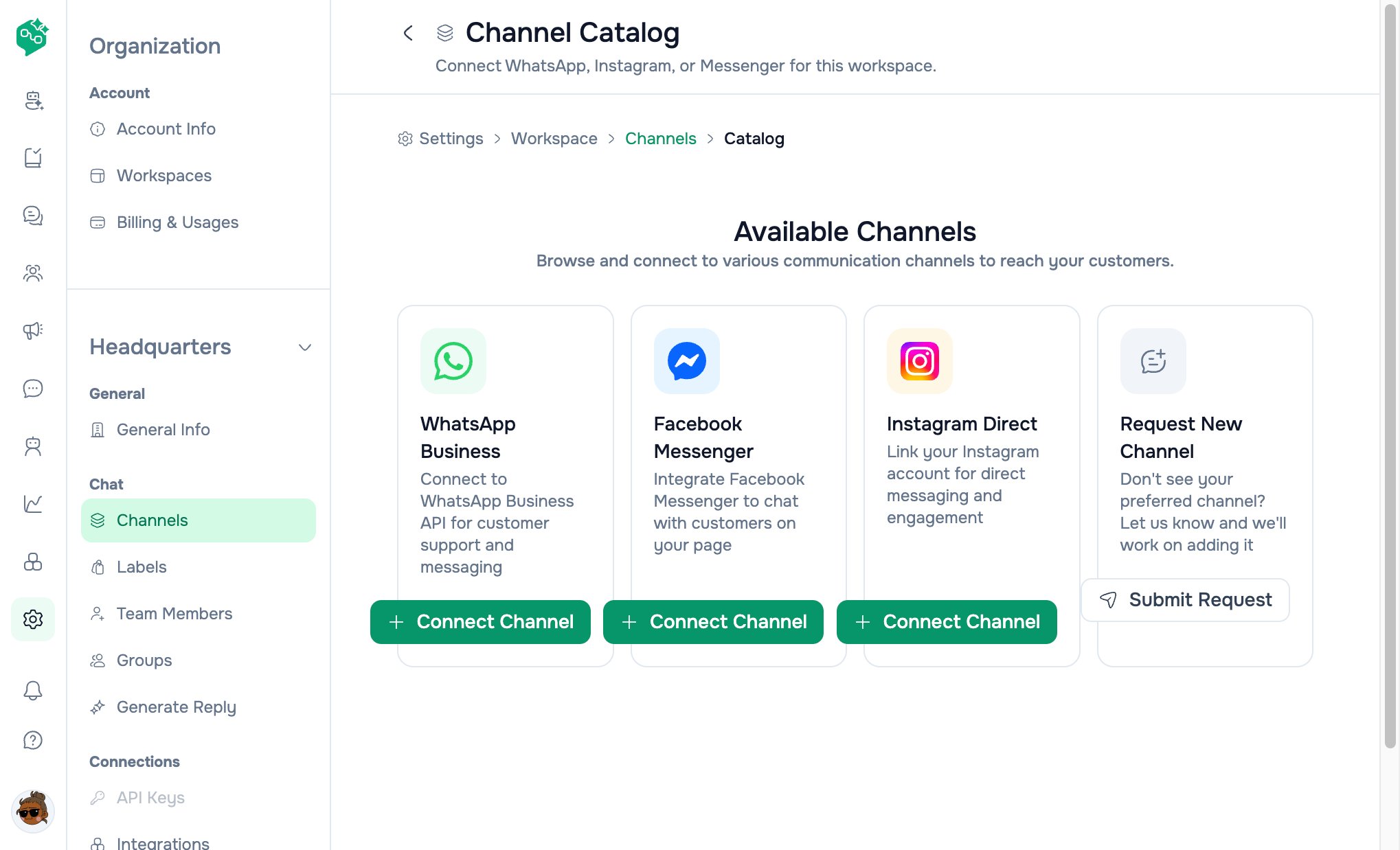
> Connect WhatsApp, Facebook Messenger, and Instagram Direct to a workspace so your team shares one Chat inbox.
Connect **WhatsApp**, **Facebook Messenger**, and **Instagram Direct** to a **workspace** so your team shares one **Chat** inbox.
**Who this is for:** Owners and admins connecting Meta channels, and Co-Admin answering *“Where do I add WhatsApp?”*
**Primary path:** **Settings → Workspace → Channels** → `/settings/workspace/channels` → **Add Channel** for the catalog.
 Business Cloud API, templates, broadcasts.
 Facebook Page messaging in the same inbox.
 Instagram Direct on the same Chat threads.
 ***
## Doc map
| Doc | Use when… |
| ---------------------------------------------------------------------------- | ------------------------------------------------------- |
| [Workspaces & channels overview](/channels/workspaces-and-channels-overview) | Org vs workspace vs channel, navigation, permissions |
| [WhatsApp](/channels/whatsapp) | Embedded signup, use cases, 24h window, troubleshooting |
| [Messenger & Instagram](/channels/messenger-and-instagram) | Page connect, Instagram Business Login |
| [Channels FAQ](/channels/channels-faq) | Short Q\&A for Co-Admin |
***
## Product snapshot
| Topic | Behavior |
| ---------------------- | ------------------------------------------------------------------------------------------------------- |
| **Self-serve connect** | WhatsApp, Messenger, Instagram only |
| **Catalog** | `/settings/workspace/channels/catalog` — **Add Channel** from list |
| **Manage** | Channel card → setup with `?channelId=` |
| **Status on list** | **Not shown** on channel cards — open **Manage** to see `pending` / `active` / `disconnected` / `error` |
| **Disconnect** | **No dashboard button** — backend API exists; customers **reconnect** via **Manage** or contact support |
| **Multiple numbers** | **Multiple WhatsApp** (and Messenger/IG) channels per workspace supported |
| **Workspace scope** | Channels do **not** copy when you create a new workspace |
| **Billing** | Channels included on paid plans; contacts/seats at **organization** level |
***
## Routes
| URL | Purpose |
| ---------------------------------------------- | ------------------------------------------------------- |
| `/settings/workspace/channels` | Connected channels grid |
| `/settings/workspace/channels/catalog` | Pick channel type to connect |
| `/settings/workspace/channels/whatsapp/setup` | WhatsApp wizard (`?mode=messaging\|ads`, `?channelId=`) |
| `/settings/workspace/channels/messenger/setup` | Messenger wizard |
| `/settings/workspace/channels/instagram/setup` | Instagram wizard |
***
## Related
* [First channel & inbox](/getting-started/first-channel-and-inbox)
* [Billing](/billing/billing-overview) — Advanced for multiple workspaces
* [Analytics](/analytics/analytics-overview) — per-channel performance
***
## Doc map
| Doc | Use when… |
| ---------------------------------------------------------------------------- | ------------------------------------------------------- |
| [Workspaces & channels overview](/channels/workspaces-and-channels-overview) | Org vs workspace vs channel, navigation, permissions |
| [WhatsApp](/channels/whatsapp) | Embedded signup, use cases, 24h window, troubleshooting |
| [Messenger & Instagram](/channels/messenger-and-instagram) | Page connect, Instagram Business Login |
| [Channels FAQ](/channels/channels-faq) | Short Q\&A for Co-Admin |
***
## Product snapshot
| Topic | Behavior |
| ---------------------- | ------------------------------------------------------------------------------------------------------- |
| **Self-serve connect** | WhatsApp, Messenger, Instagram only |
| **Catalog** | `/settings/workspace/channels/catalog` — **Add Channel** from list |
| **Manage** | Channel card → setup with `?channelId=` |
| **Status on list** | **Not shown** on channel cards — open **Manage** to see `pending` / `active` / `disconnected` / `error` |
| **Disconnect** | **No dashboard button** — backend API exists; customers **reconnect** via **Manage** or contact support |
| **Multiple numbers** | **Multiple WhatsApp** (and Messenger/IG) channels per workspace supported |
| **Workspace scope** | Channels do **not** copy when you create a new workspace |
| **Billing** | Channels included on paid plans; contacts/seats at **organization** level |
***
## Routes
| URL | Purpose |
| ---------------------------------------------- | ------------------------------------------------------- |
| `/settings/workspace/channels` | Connected channels grid |
| `/settings/workspace/channels/catalog` | Pick channel type to connect |
| `/settings/workspace/channels/whatsapp/setup` | WhatsApp wizard (`?mode=messaging\|ads`, `?channelId=`) |
| `/settings/workspace/channels/messenger/setup` | Messenger wizard |
| `/settings/workspace/channels/instagram/setup` | Instagram wizard |
***
## Related
* [First channel & inbox](/getting-started/first-channel-and-inbox)
* [Billing](/billing/billing-overview) — Advanced for multiple workspaces
* [Analytics](/analytics/analytics-overview) — per-channel performance