> ## Documentation Index
> Fetch the complete documentation index at: https://docs.vendschat.com/llms.txt
> Use this file to discover all available pages before exploring further.
# Plans, billing & usage
> Everything workspace owners and admins need to understand Vendschat subscriptions — what you pay for, what counts toward limits, where to check usage,…
Everything workspace owners and admins need to understand Vendschat subscriptions — what you pay for, what counts toward limits, where to check usage, and how to upgrade without surprise bills.
**Who this is for:** Organization owners (billing), admins (usage monitoring), and anyone asking Co-Admin about plans, invoices, seats, or contact limits.
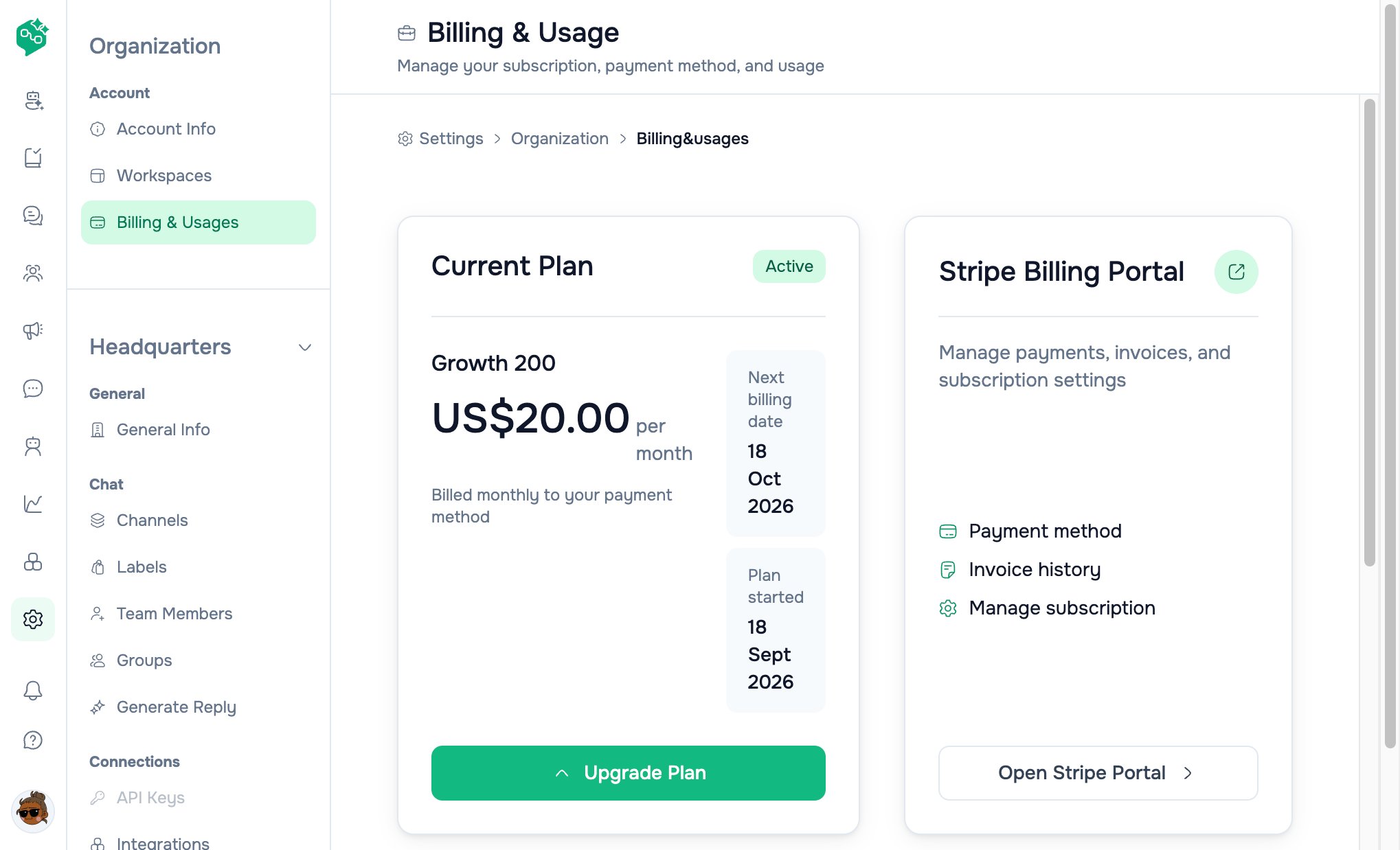
**Where to go in the app:** **Settings → Organization → Billing & Usages** (`/settings/organization/billing&usages`) and **Plans** (`/settings/organization/billing&usages/plans`). The page heading is **Billing & Usage**; the settings nav label is **Billing & Usages**.
 **Hub:** [Billing overview](/billing/billing-overview) — doc map and route reference.
**Public pricing page:** [vendschat.com/pricing](https://vendschat.com/pricing) — same tiers; in-app Plans shows live checkout prices.
***
## Quick reference
| Topic | Answer in one line |
| --------------------------- | --------------------------------------------------------------------------------- |
| Plan families | **Starter**, **Growth** (contact tiers), **Advanced** (contact tiers + API + n8n) |
| Included on every paid plan | WhatsApp, Instagram, Messenger; 10 team seats free; core inbox & AI assist |
| What “contacts” means | **Unique people** your organization messages in the **current billing period** |
| Starter contacts | **Unlimited** — no monthly contact cap |
| Growth / Advanced contacts | **Included bucket** (200–1500) + **\$0.125** per extra contact if you go over |
| Extra seats | **$10/seat/mo** on Starter; **$20/seat/mo** on Growth & Advanced (after 10 free) |
| Who can pay or change plan | **Organization owner** only |
| Payment & invoices | **Stripe** — open **Stripe Billing Portal** from Billing & Usage |
| Free trial | **14-day Growth trial**, no credit card (signup from marketing site) |
| Enterprise (1500+ contacts) | **Contact Sales** — custom quote |
***
## Example: GrowStudio Apps
GrowStudio starts on **Starter**, hits heavy WhatsApp traffic mid-quarter, then launches a broadcast campaign.
| Signal | What it means | Action |
| ------------------------------------------ | ------------------------------------------------- | -------------------------------------------------------------- |
| Billing & Usage shows high message volume | Starter has **unlimited contacts** — no cap worry | Stay on Starter if features are enough |
| Team wants **Broadcasts** + **webhooks** | Starter does not include those | Upgrade to **Growth** before the campaign |
| Usage shows `180 / 200 contacts` on Growth | Approaching included bucket | Upgrade contact tier **or** accept **\$0.125/contact** overage |
| Hiring 3 more agents (13 total) | 10 seats free; 3 extra × \$20 on Growth | Adjust seats at checkout or after subscribe |
| Admin (not owner) tries to upgrade | Only **owner** can checkout | Admin asks owner, or owner delegates billing |
**Lesson:** Check **Billing & Usage** before big broadcasts or hiring — upgrade **before** the event, not after failures or overage surprises.
***
## How Vendschat billing is structured
### Organization vs workspace
* **Billing is per organization**, not per workspace.
* One organization can have **multiple workspaces** (Advanced plan — see feature matrix).
* **Contacts** and **seats** are counted at the **organization** level across all workspaces.
* Every team member in any workspace under the org shares the same plan limits.
### Subscription lifecycle statuses
You may see these on **Billing & Usage**:
| Status | Meaning |
| ------------ | --------------------------------------------- |
| **Active** | Paid plan in good standing |
| **Trialing** | Free trial period (typically Growth) |
| **Past due** | Payment failed — update card in Stripe portal |
| **Canceled** | Subscription ended |
| **Unpaid** | Outstanding balance — service may be limited |
### Billing cycle
* Choose **monthly** or **annual** at subscribe/upgrade.
* **Annual billing saves up to 20%** vs twelve monthly payments.
* **Current period** start and end dates appear on **Billing & Usage** (“Plan started” / “Next billing date”).
* Plans **auto-renew** unless canceled before the renewal date.
* **Cancellation** takes effect at the **end of the paid period** — no prorated refund for unused time (see refund policy below).
### Payment processor
* All card payments run through **Stripe**.
* Taxes (VAT, GST, sales tax) may apply and are **your responsibility** — prices shown are typically **exclusive of tax**.
* **Third-party messaging fees** (e.g. Meta WhatsApp conversation charges) are **separate** from your Vendschat subscription.
***
## Plan families at a glance
Vendschat has three **marketing tiers**. Growth and Advanced each have **contact volume sub-tiers** you pick with a slider on the Plans page.
| Family | Monthly base (from) | Contacts | Extra seats | Best for |
| ------------ | ---------------------- | ------------------------- | ----------------------- | ------------------------------------------------------------------------------------------- |
| **Starter** | \$40/mo | **Unlimited** | \$10/seat after 10 free | Small shop, testing WhatsApp support, unlimited reach on a budget |
| **Growth** | \$20/mo (200 contacts) | 200 – 1500 included tiers | \$20/seat after 10 free | Broadcasts, integrations, custom AI Agents, webhooks |
| **Advanced** | \$30/mo (200 contacts) | Same tiers as Growth | \$20/seat after 10 free | Everything in Growth + **Developer API**, **multiple workspaces**, **managed n8n instance** |
For the **full price table** by contact tier, see [Pricing & plan reference](/billing/pricing-plans-reference).
### Growth vs Advanced at the same contact tier
At the same contact bucket (e.g. 500 contacts), **Advanced costs more** because it adds:
* **Developer API** access
* **Multiple workspaces** under one organization
* **Managed n8n instance** (4 vCPU, 8 GB RAM, 75 GB NVMe, auto backup — upgradable from dashboard)
* **Dedicated account manager** and **SLA** (support tier)
If you only need broadcasts and Zapier, **Growth** is usually enough. Choose **Advanced** when engineering needs API access or isolated workspaces per brand/client.
### Enterprise: 1500+ contacts
When the contact slider hits **1500+**, pricing switches to **Contact Sales** — no self-serve Stripe checkout. Email sales or use the contact link on the Plans page for a tailored quote (volume, compliance, custom terms).
Internal plan keys for this tier: `growth_1500_plus`, `advanced_1500_plus`.
***
## What “usage” means
### Contacts (monthly active)
**Definition:** The number of **unique contacts** your organization **messages** during the **current billing period** (cycle start → cycle end).
| Rule | Detail |
| ----------------- | ---------------------------------------------------------------------------------------------- |
| Counting unit | **One contact = one person**, once per billing cycle |
| Repeat messages | Messaging the **same** person again in the same cycle does **not** double-count |
| Scope | **Organization-wide** — all workspaces combined |
| Direction | Counts when your team **sends** outbound messages that bill the contact (first touch in cycle) |
| Starter | **Unlimited** — UI shows usage but no cap |
| Growth / Advanced | Hard **included limit** per tier; beyond that → **overage** |
**Where to see it:** **Billing & Usage → Usage Overview → Contacts** — shows `used / limit`, progress bar, and **remaining** count.
**Overage:** On Growth and Advanced, extra contacts beyond your included bucket are charged \**$0.125 per contact** for that billing period. The UI states: *“Additional contacts charged at $0.125 each.”* Overage is billed automatically — you do not need to manually upgrade mid-cycle for overage to apply (though upgrading tier may be cheaper if you consistently exceed).
### Seats (team members)
**Definition:** People on your account who can log in and work in workspaces.
| Rule | Detail |
| --------------- | ---------------------------------------------------------------------------------------------------------------------------------------------------------- |
| Included | **10 seats free** on every plan |
| Above 10 | Billed per seat: **$10/mo** (Starter) or **$20/mo** (Growth & Advanced) |
| UI labels | **Active** = seats you’re using now; **Billed** = what Stripe charges this period |
| Downgrade seats | **Active** can drop immediately; **Billed** may stay higher until **end of billing period** — UI shows *“Seats will reduce to X at end of billing period”* |
**Important:** “Seats” are **login accounts**, not “agents online today.” A part-time freelancer who has an account counts as one seat.
### Plan cycle dates
| Field in app | Meaning |
| --------------------- | ------------------------------------------- |
| **Plan started** | Start of current Stripe billing period |
| **Next billing date** | End of current period / renewal charge date |
Usage counters for contacts **reset** at the start of each new billing period.
***
## Where to manage billing in the dashboard
### Billing & Usage (main page)
Path: **Settings → Organization → Billing & Usages**
| Section | What you see |
| ------------------------- | -------------------------------------------------------------------------------------------------------------------------------------------- |
| **Current Plan** | Plan name (e.g. “Growth 500”), **base price**, status badge (**Active** or raw status such as `trialing`, `past_due`) |
| **Billing subtext** | *“Billed monthly to your payment method”* under base price (shown even when subscription is annual — confirm cycle on **Next billing date**) |
| **Upgrade Plan** | Button (owners only) → Plans page |
| **Stripe Billing Portal** | Payment method, invoice history, subscription management |
| **Usage Overview** | Contacts (progress bar on Growth/Advanced), Seats (active vs billed), Overage card when > \$0 |
Non-owners see usage but get *“Contact owner to manage billing”* instead of portal/checkout buttons.
### Plans page
Path: **Settings → Organization → Billing & Usage → Plans** (or **Upgrade Plan**)
| Control | Purpose |
| --------------------------- | --------------------------------------------------------------------------------------------- |
| **Monthly / Annual** toggle | Annual shows “Save up to 20%” |
| **Starter card** | Fixed \$40 base; unlimited contacts; seat selector |
| **Growth / Advanced cards** | Contact tier **slider** (200 … 1500+); seat selector |
| **Subscribe / Upgrade** | Opens **Stripe Checkout** (owners only); current tier shows **Current Plan** (no re-checkout) |
| **Contact Sales** | For **1500+** tiers — opens sales email link (no Stripe checkout) |
| **View Full Comparison** | Collapsible feature matrix at bottom of Plans page |
After successful checkout, you return to Billing & Usage with `?success=true`. Canceled checkout returns to Plans with `?canceled=true`.
**Price on plan cards:** Totals on the Plans page use in-app **display prices** plus selected extra seats. **Stripe Checkout** charges the live Stripe price IDs from the catalog — if display and Stripe ever differ, the checkout total is authoritative.
***
## Who can do what
| Action | Owner | Admin | Member |
| --------------------------- | ----- | ----- | ---------------------- |
| View usage & current plan | ✅ | ✅ | ✅ (if settings access) |
| Upgrade / subscribe | ✅ | ❌ | ❌ |
| Open Stripe portal | ✅ | ❌ | ❌ |
| Request downgrade | ✅ | ❌ | ❌ |
| Change seat count (billing) | ✅ | ❌ | ❌ |
**Tip:** Designate **one owner** as billing contact; admins can monitor usage and nudge before limits hit.
***
## Upgrading
### When to upgrade from Starter → Growth
Consider **Growth** when you need **any** of:
* **WhatsApp Broadcasts** to labeled segments
* **Incoming & outgoing webhooks**
* **Zapier, Make, or n8n** integrations (Growth connects; Advanced adds hosted n8n)
* **Custom AI Agents** with knowledge sync (website/files)
* **Team internal chat**
* **Priority support**
Starter still includes: full chat suite, AI Reply generate, summaries, labels (basic), team collaboration, reports, mobile app, all three messaging channels.
### When to upgrade Growth → Advanced
Consider **Advanced** when you need **any** of:
* **Developer REST API** + API keys for custom backends
* **Multiple workspaces** (e.g. agency per client, or brands separated)
* **Managed n8n instance** included (4 vCPU / 8 GB RAM / 75 GB NVMe)
* **Dedicated account manager** or **SLA**
### How to upgrade (owner)
1. Go to **Settings → Billing & Usage → Plans**
2. Pick **monthly** or **annual**
3. Select contact tier (Growth/Advanced) and total seats if > 10
4. Click **Subscribe** or **Upgrade**
5. Complete **Stripe Checkout** (promotion codes supported)
6. Confirm new plan on **Billing & Usage**
Upgrades typically take effect immediately after successful payment; Stripe may prorate.
***
## Downgrading
### Plan downgrade
There is **no downgrade button** in the dashboard UI today. Downgrades go through:
1. **Stripe Billing Portal → Manage subscription**, or
2. **Support / sales** review, or
3. Backend **`POST /settings/plan/downgrade-request`** (owner only) — creates a `pending_sales` request with `risk_data_loss` when current contact usage exceeds the target tier limit
**Before downgrading:** Reduce contact usage below the new limit **or** accept that overage rules change. Export anything you need from Analytics if retiring features (e.g. API access on Advanced → Growth).
### Seat changes after subscribe
* **Increase seats:** Adjust at next **Plans** checkout for new subscribers, or use **Stripe portal** where available. Backend **`POST /settings/plan/seats/change`** exists (owner, prorated upgrade) but is **not** exposed as a button on the Billing & Usage page.
* **Decrease seats:** See seat downgrade below — active drops now; billed at period end.
### Seat downgrade
* Lowering seats below current **billed** count: **active** seats drop now; **billing** adjusts at **period end** — UI shows *“Seats will reduce to X at end of billing period”*
### Cancel subscription
Use **Stripe Billing Portal → Manage subscription** or contact **[support@vendschat.com](mailto:support@vendschat.com)**. Cancellation applies at **period end**. Portal return URL after payment management: `/settings/organization/billing&usages`.
***
## Backend billing API (reference)
| Endpoint | Purpose |
| ------------------------------------------- | ------------------------------------------------------------------------------------------------------ |
| `GET /settings/plan/catalog` | Stripe price IDs, contact limits, seat/overage unit prices |
| `GET /settings/plan/subscription` | Current org subscription row |
| `GET /settings/plan/usage` | Plan, seats, contacts, invoice snapshot for dashboard |
| `POST /settings/plan/checkout-session` | Stripe Checkout (owner) — supports `additional_seats`, promotion codes |
| `POST /settings/plan/stripe-portal-session` | Stripe Billing Portal (owner; requires existing Stripe customer) |
| `POST /settings/plan/seats/change` | Seat upgrade (prorated) or downgrade (effective period end) |
| `POST /settings/plan/downgrade-request` | Plan downgrade request → `pending_sales` |
| `POST /settings/plan/contacts/track` | Record unique contact for billing cycle + Stripe overage meter (called when messaging bills a contact) |
**Free tier:** New orgs without checkout get `plan_tier: free`, `contact_limit: 100`, until a paid subscription is created via Stripe webhook after checkout.
***
## Free trial
| Item | Detail |
| --------------------- | ------------------------------------------------------------------------ |
| Offer | **14-day free trial** on **Growth** (marketing signup) |
| Credit card | **Not required** to start trial |
| Conversion | Trial does **not** auto-convert — you must **choose and pay** for a plan |
| Features during trial | Some channel connections or features may be restricted |
| After trial | Select Starter, Growth, or Advanced to continue |
Landing CTA: *“Free 14-day trial. No credit card required.”*
***
## Overage & automatic billing adjustments
### Contact overage (Growth & Advanced)
1. You message a **new unique contact** beyond your included limit
2. System records overage for the cycle
3. Stripe metered line item increments (**\$0.125** per contact)
4. **Billing & Usage** may show an **Overage** card with running amount
5. Charge appears on the **period invoice**
**FAQ pattern:** *“What happens if I exceed my limits?”* — You’re notified as you approach the cap; billing **adjusts automatically** for on-demand usage. No manual upgrade required for overage to accrue (though a higher tier may save money at scale).
### Starter
No contact overage — unlimited contacts included in base price.
***
## Pricing mechanics (seats + annual)
### Example: Growth 500 with 15 seats, monthly
* Base Growth 500: **\$40/mo**
* Included seats: 10
* Extra seats: 5 × **$20** = **$100/mo**
* **Total: \$140/mo** (before tax)
### Example: Starter with 12 seats, annual
* Base: **$40/mo** → annual total **$384/yr** (20% off × 12)
* Extra seats: 2 × $10 = $20/mo → annual seat portion discounted similarly at checkout
* UI shows effective monthly equivalent on annual toggle
Always confirm the total on the **Plans** card before checkout — it updates live when you change seats or contact tier.
***
## Features by plan (summary)
All plans include **WhatsApp Business**, **Facebook Messenger**, and **Instagram Direct**.
| Feature area | Starter | Growth | Advanced |
| --------------------------------------- | ------- | -------- | ------------ |
| Chat application suite | ✅ | ✅ | ✅ |
| Team collaboration | ✅ | ✅ | ✅ |
| AI Reply Generator & chat summarization | ✅ | ✅ | ✅ |
| Reports & analytics | ✅ | ✅ | ✅ |
| Mobile app | ✅ | ✅ | ✅ |
| Label management | Basic | Advanced | Advanced |
| Team internal chat | ❌ | ✅ | ✅ |
| Broadcasts | ❌ | ✅ | ✅ |
| Custom AI Agents | ❌ | ✅ | ✅ |
| Webhooks | ❌ | ✅ | ✅ |
| Zapier / Make / n8n integration | ❌ | ✅ | ✅ |
| Managed n8n instance | ❌ | ❌ | ✅ (included) |
| Developer API | ❌ | ❌ | ✅ |
| Multiple workspaces | ❌ | ❌ | ✅ |
| Community support | ✅ | ✅ | ✅ |
| Priority support | ❌ | ✅ | ✅ |
| Dedicated account manager & SLA | ❌ | ❌ | ✅ |
Full row-by-row matrix: [Pricing & plan reference](/billing/pricing-plans-reference).
***
## n8n on Advanced
**Advanced** includes a **managed n8n instance** (not available on Starter or Growth alone):
| Spec | Value |
| ------- | --------------------------------------- |
| Compute | **4 vCPU** |
| Memory | **8 GB RAM** |
| Storage | **75 GB NVMe** |
| Backup | **Auto backup** |
| Scaling | **Upgradable on demand** from dashboard |
Use n8n to chain inbound messages → CRM → Slack → custom logic. Growth plan can still use **external** n8n via webhooks/Zapier; Advanced gives you **hosted** capacity.
***
## Discounts & special programs
| Program | Benefit | How to apply |
| -------------------- | -------------------------------------------- | ---------------------------------------------------------- |
| **Annual billing** | Up to **20% off** vs monthly | Toggle **Annual** on Plans or pricing page |
| **Non-profits** | **20% discount** for qualified organizations | Contact **support** to apply |
| **Promotion codes** | Varies | Enter at Stripe Checkout (`allow_promotion_codes` enabled) |
| **Enterprise 1500+** | Custom pricing | **Contact Sales** |
***
## Invoices, refunds & policy highlights
Aligned with Vendschat Terms of Service:
| Topic | Policy |
| ------------------- | ---------------------------------------------------------------------------------------------------------------------- |
| **Refunds** | Subscription fees **non-refundable** except where law requires; no credits for partial periods or mid-cycle downgrades |
| **Refund requests** | Case-by-case — email **[support@vendschat.com](mailto:support@vendschat.com)** |
| **Price changes** | **30 days’ notice** before new prices apply; continued use after = acceptance |
| **Late payment** | May incur late fee; service may suspend |
| **Invoice access** | **Stripe Billing Portal → Invoice history** |
***
## Meta / WhatsApp costs (separate bill)
Vendschat subscription **does not include** Meta WhatsApp conversation fees. Depending on region and conversation category, Meta may charge per 24-hour conversation window. Those charges are:
* Paid **directly to Meta** or via your BSP, **or**
* Invoiced separately if Vendschat resells access
Coach customers to check **Analytics** for delivery metrics and Meta’s own billing for conversation costs.
***
## Practical monitoring habits
1. **Monthly calendar reminder** — check contacts at **70%** of limit (Growth/Advanced)
2. **Before peak season** (Black Friday, holidays) — upgrade tier or budget for overage
3. **One billing owner** — clear escalation for admins
4. **After hiring** — reconcile seat count in Plans vs actual accounts
5. **Ask Co-Admin** — *“How many contacts have we used?”*, *“What plan are we on?”*, *“What’s included in Growth?”*
***
## Common customer questions (Co-Admin answer patterns)
| Question | Guidance |
| --------------------------------------------------------- | ---------------------------------------------------------------------------------------------------------------------------------- |
| *How many contacts do we have left?* | Direct to **Billing & Usage → Contacts** — `remaining` count and % used |
| *Why can’t I upgrade?* | Only **organization owner** can; admins must ask owner |
| *Are we charged per message?* | No — charged per **unique contact per billing period** (Growth/Advanced); Starter unlimited contacts |
| *Same customer on WhatsApp and Instagram — two contacts?* | Typically **one contact record** per person in Vendschat; billing counts **unique contacts messaged**, not channels |
| *Can I switch monthly ↔ annual?* | Manage via **Stripe portal** or upgrade flow; changes follow Stripe rules |
| *Do broadcasts count toward contacts?* | Yes — each **unique recipient** messaged in the cycle counts |
| *What’s the difference between Growth and Advanced?* | Same contact tiers possible; Advanced adds **API**, **multi-workspace**, **hosted n8n**, premium support |
| *Is there a free plan?* | New orgs may start on internal **free** tier with limited contacts until subscribing; marketing emphasizes **14-day Growth trial** |
| *Non-profit discount?* | **20%** — contact support with proof of status |
More Q\&A: [Billing FAQ](/billing/billing-faq).
***
## Starter → Growth → Advanced decision tree
```
Need only inbox + unlimited contacts + basic AI?
└─ Starter ($40/mo)
Need broadcasts, webhooks, integrations, or custom AI Agents?
└─ Growth (pick contact tier 200–1500)
Need API, multiple workspaces, or hosted n8n?
└─ Advanced (same contact tiers, higher base)
Need >1500 contacts/month or custom contract?
└─ Contact Sales (1500+)
```
***
## Related docs
* [Billing overview](/billing/billing-overview) — hub and route map
* [Pricing & plan reference](/billing/pricing-plans-reference) — complete price table, internal tier names, feature matrix
* [Billing FAQ](/billing/billing-faq) — extended question bank for support AI
* [Integrations overview](/integrations/integrations-and-automation-overview) — Growth+ features
* [Broadcasts](/broadcasts/campaigns) — Growth+ campaigns
* [AI Agents overview](/ai-agents/ai-agents-overview) — custom agents on Growth+
* [Terms of Service](/terms-of-service/terms-of-service) — legal billing terms
**Hub:** [Billing overview](/billing/billing-overview) — doc map and route reference.
**Public pricing page:** [vendschat.com/pricing](https://vendschat.com/pricing) — same tiers; in-app Plans shows live checkout prices.
***
## Quick reference
| Topic | Answer in one line |
| --------------------------- | --------------------------------------------------------------------------------- |
| Plan families | **Starter**, **Growth** (contact tiers), **Advanced** (contact tiers + API + n8n) |
| Included on every paid plan | WhatsApp, Instagram, Messenger; 10 team seats free; core inbox & AI assist |
| What “contacts” means | **Unique people** your organization messages in the **current billing period** |
| Starter contacts | **Unlimited** — no monthly contact cap |
| Growth / Advanced contacts | **Included bucket** (200–1500) + **\$0.125** per extra contact if you go over |
| Extra seats | **$10/seat/mo** on Starter; **$20/seat/mo** on Growth & Advanced (after 10 free) |
| Who can pay or change plan | **Organization owner** only |
| Payment & invoices | **Stripe** — open **Stripe Billing Portal** from Billing & Usage |
| Free trial | **14-day Growth trial**, no credit card (signup from marketing site) |
| Enterprise (1500+ contacts) | **Contact Sales** — custom quote |
***
## Example: GrowStudio Apps
GrowStudio starts on **Starter**, hits heavy WhatsApp traffic mid-quarter, then launches a broadcast campaign.
| Signal | What it means | Action |
| ------------------------------------------ | ------------------------------------------------- | -------------------------------------------------------------- |
| Billing & Usage shows high message volume | Starter has **unlimited contacts** — no cap worry | Stay on Starter if features are enough |
| Team wants **Broadcasts** + **webhooks** | Starter does not include those | Upgrade to **Growth** before the campaign |
| Usage shows `180 / 200 contacts` on Growth | Approaching included bucket | Upgrade contact tier **or** accept **\$0.125/contact** overage |
| Hiring 3 more agents (13 total) | 10 seats free; 3 extra × \$20 on Growth | Adjust seats at checkout or after subscribe |
| Admin (not owner) tries to upgrade | Only **owner** can checkout | Admin asks owner, or owner delegates billing |
**Lesson:** Check **Billing & Usage** before big broadcasts or hiring — upgrade **before** the event, not after failures or overage surprises.
***
## How Vendschat billing is structured
### Organization vs workspace
* **Billing is per organization**, not per workspace.
* One organization can have **multiple workspaces** (Advanced plan — see feature matrix).
* **Contacts** and **seats** are counted at the **organization** level across all workspaces.
* Every team member in any workspace under the org shares the same plan limits.
### Subscription lifecycle statuses
You may see these on **Billing & Usage**:
| Status | Meaning |
| ------------ | --------------------------------------------- |
| **Active** | Paid plan in good standing |
| **Trialing** | Free trial period (typically Growth) |
| **Past due** | Payment failed — update card in Stripe portal |
| **Canceled** | Subscription ended |
| **Unpaid** | Outstanding balance — service may be limited |
### Billing cycle
* Choose **monthly** or **annual** at subscribe/upgrade.
* **Annual billing saves up to 20%** vs twelve monthly payments.
* **Current period** start and end dates appear on **Billing & Usage** (“Plan started” / “Next billing date”).
* Plans **auto-renew** unless canceled before the renewal date.
* **Cancellation** takes effect at the **end of the paid period** — no prorated refund for unused time (see refund policy below).
### Payment processor
* All card payments run through **Stripe**.
* Taxes (VAT, GST, sales tax) may apply and are **your responsibility** — prices shown are typically **exclusive of tax**.
* **Third-party messaging fees** (e.g. Meta WhatsApp conversation charges) are **separate** from your Vendschat subscription.
***
## Plan families at a glance
Vendschat has three **marketing tiers**. Growth and Advanced each have **contact volume sub-tiers** you pick with a slider on the Plans page.
| Family | Monthly base (from) | Contacts | Extra seats | Best for |
| ------------ | ---------------------- | ------------------------- | ----------------------- | ------------------------------------------------------------------------------------------- |
| **Starter** | \$40/mo | **Unlimited** | \$10/seat after 10 free | Small shop, testing WhatsApp support, unlimited reach on a budget |
| **Growth** | \$20/mo (200 contacts) | 200 – 1500 included tiers | \$20/seat after 10 free | Broadcasts, integrations, custom AI Agents, webhooks |
| **Advanced** | \$30/mo (200 contacts) | Same tiers as Growth | \$20/seat after 10 free | Everything in Growth + **Developer API**, **multiple workspaces**, **managed n8n instance** |
For the **full price table** by contact tier, see [Pricing & plan reference](/billing/pricing-plans-reference).
### Growth vs Advanced at the same contact tier
At the same contact bucket (e.g. 500 contacts), **Advanced costs more** because it adds:
* **Developer API** access
* **Multiple workspaces** under one organization
* **Managed n8n instance** (4 vCPU, 8 GB RAM, 75 GB NVMe, auto backup — upgradable from dashboard)
* **Dedicated account manager** and **SLA** (support tier)
If you only need broadcasts and Zapier, **Growth** is usually enough. Choose **Advanced** when engineering needs API access or isolated workspaces per brand/client.
### Enterprise: 1500+ contacts
When the contact slider hits **1500+**, pricing switches to **Contact Sales** — no self-serve Stripe checkout. Email sales or use the contact link on the Plans page for a tailored quote (volume, compliance, custom terms).
Internal plan keys for this tier: `growth_1500_plus`, `advanced_1500_plus`.
***
## What “usage” means
### Contacts (monthly active)
**Definition:** The number of **unique contacts** your organization **messages** during the **current billing period** (cycle start → cycle end).
| Rule | Detail |
| ----------------- | ---------------------------------------------------------------------------------------------- |
| Counting unit | **One contact = one person**, once per billing cycle |
| Repeat messages | Messaging the **same** person again in the same cycle does **not** double-count |
| Scope | **Organization-wide** — all workspaces combined |
| Direction | Counts when your team **sends** outbound messages that bill the contact (first touch in cycle) |
| Starter | **Unlimited** — UI shows usage but no cap |
| Growth / Advanced | Hard **included limit** per tier; beyond that → **overage** |
**Where to see it:** **Billing & Usage → Usage Overview → Contacts** — shows `used / limit`, progress bar, and **remaining** count.
**Overage:** On Growth and Advanced, extra contacts beyond your included bucket are charged \**$0.125 per contact** for that billing period. The UI states: *“Additional contacts charged at $0.125 each.”* Overage is billed automatically — you do not need to manually upgrade mid-cycle for overage to apply (though upgrading tier may be cheaper if you consistently exceed).
### Seats (team members)
**Definition:** People on your account who can log in and work in workspaces.
| Rule | Detail |
| --------------- | ---------------------------------------------------------------------------------------------------------------------------------------------------------- |
| Included | **10 seats free** on every plan |
| Above 10 | Billed per seat: **$10/mo** (Starter) or **$20/mo** (Growth & Advanced) |
| UI labels | **Active** = seats you’re using now; **Billed** = what Stripe charges this period |
| Downgrade seats | **Active** can drop immediately; **Billed** may stay higher until **end of billing period** — UI shows *“Seats will reduce to X at end of billing period”* |
**Important:** “Seats” are **login accounts**, not “agents online today.” A part-time freelancer who has an account counts as one seat.
### Plan cycle dates
| Field in app | Meaning |
| --------------------- | ------------------------------------------- |
| **Plan started** | Start of current Stripe billing period |
| **Next billing date** | End of current period / renewal charge date |
Usage counters for contacts **reset** at the start of each new billing period.
***
## Where to manage billing in the dashboard
### Billing & Usage (main page)
Path: **Settings → Organization → Billing & Usages**
| Section | What you see |
| ------------------------- | -------------------------------------------------------------------------------------------------------------------------------------------- |
| **Current Plan** | Plan name (e.g. “Growth 500”), **base price**, status badge (**Active** or raw status such as `trialing`, `past_due`) |
| **Billing subtext** | *“Billed monthly to your payment method”* under base price (shown even when subscription is annual — confirm cycle on **Next billing date**) |
| **Upgrade Plan** | Button (owners only) → Plans page |
| **Stripe Billing Portal** | Payment method, invoice history, subscription management |
| **Usage Overview** | Contacts (progress bar on Growth/Advanced), Seats (active vs billed), Overage card when > \$0 |
Non-owners see usage but get *“Contact owner to manage billing”* instead of portal/checkout buttons.
### Plans page
Path: **Settings → Organization → Billing & Usage → Plans** (or **Upgrade Plan**)
| Control | Purpose |
| --------------------------- | --------------------------------------------------------------------------------------------- |
| **Monthly / Annual** toggle | Annual shows “Save up to 20%” |
| **Starter card** | Fixed \$40 base; unlimited contacts; seat selector |
| **Growth / Advanced cards** | Contact tier **slider** (200 … 1500+); seat selector |
| **Subscribe / Upgrade** | Opens **Stripe Checkout** (owners only); current tier shows **Current Plan** (no re-checkout) |
| **Contact Sales** | For **1500+** tiers — opens sales email link (no Stripe checkout) |
| **View Full Comparison** | Collapsible feature matrix at bottom of Plans page |
After successful checkout, you return to Billing & Usage with `?success=true`. Canceled checkout returns to Plans with `?canceled=true`.
**Price on plan cards:** Totals on the Plans page use in-app **display prices** plus selected extra seats. **Stripe Checkout** charges the live Stripe price IDs from the catalog — if display and Stripe ever differ, the checkout total is authoritative.
***
## Who can do what
| Action | Owner | Admin | Member |
| --------------------------- | ----- | ----- | ---------------------- |
| View usage & current plan | ✅ | ✅ | ✅ (if settings access) |
| Upgrade / subscribe | ✅ | ❌ | ❌ |
| Open Stripe portal | ✅ | ❌ | ❌ |
| Request downgrade | ✅ | ❌ | ❌ |
| Change seat count (billing) | ✅ | ❌ | ❌ |
**Tip:** Designate **one owner** as billing contact; admins can monitor usage and nudge before limits hit.
***
## Upgrading
### When to upgrade from Starter → Growth
Consider **Growth** when you need **any** of:
* **WhatsApp Broadcasts** to labeled segments
* **Incoming & outgoing webhooks**
* **Zapier, Make, or n8n** integrations (Growth connects; Advanced adds hosted n8n)
* **Custom AI Agents** with knowledge sync (website/files)
* **Team internal chat**
* **Priority support**
Starter still includes: full chat suite, AI Reply generate, summaries, labels (basic), team collaboration, reports, mobile app, all three messaging channels.
### When to upgrade Growth → Advanced
Consider **Advanced** when you need **any** of:
* **Developer REST API** + API keys for custom backends
* **Multiple workspaces** (e.g. agency per client, or brands separated)
* **Managed n8n instance** included (4 vCPU / 8 GB RAM / 75 GB NVMe)
* **Dedicated account manager** or **SLA**
### How to upgrade (owner)
1. Go to **Settings → Billing & Usage → Plans**
2. Pick **monthly** or **annual**
3. Select contact tier (Growth/Advanced) and total seats if > 10
4. Click **Subscribe** or **Upgrade**
5. Complete **Stripe Checkout** (promotion codes supported)
6. Confirm new plan on **Billing & Usage**
Upgrades typically take effect immediately after successful payment; Stripe may prorate.
***
## Downgrading
### Plan downgrade
There is **no downgrade button** in the dashboard UI today. Downgrades go through:
1. **Stripe Billing Portal → Manage subscription**, or
2. **Support / sales** review, or
3. Backend **`POST /settings/plan/downgrade-request`** (owner only) — creates a `pending_sales` request with `risk_data_loss` when current contact usage exceeds the target tier limit
**Before downgrading:** Reduce contact usage below the new limit **or** accept that overage rules change. Export anything you need from Analytics if retiring features (e.g. API access on Advanced → Growth).
### Seat changes after subscribe
* **Increase seats:** Adjust at next **Plans** checkout for new subscribers, or use **Stripe portal** where available. Backend **`POST /settings/plan/seats/change`** exists (owner, prorated upgrade) but is **not** exposed as a button on the Billing & Usage page.
* **Decrease seats:** See seat downgrade below — active drops now; billed at period end.
### Seat downgrade
* Lowering seats below current **billed** count: **active** seats drop now; **billing** adjusts at **period end** — UI shows *“Seats will reduce to X at end of billing period”*
### Cancel subscription
Use **Stripe Billing Portal → Manage subscription** or contact **[support@vendschat.com](mailto:support@vendschat.com)**. Cancellation applies at **period end**. Portal return URL after payment management: `/settings/organization/billing&usages`.
***
## Backend billing API (reference)
| Endpoint | Purpose |
| ------------------------------------------- | ------------------------------------------------------------------------------------------------------ |
| `GET /settings/plan/catalog` | Stripe price IDs, contact limits, seat/overage unit prices |
| `GET /settings/plan/subscription` | Current org subscription row |
| `GET /settings/plan/usage` | Plan, seats, contacts, invoice snapshot for dashboard |
| `POST /settings/plan/checkout-session` | Stripe Checkout (owner) — supports `additional_seats`, promotion codes |
| `POST /settings/plan/stripe-portal-session` | Stripe Billing Portal (owner; requires existing Stripe customer) |
| `POST /settings/plan/seats/change` | Seat upgrade (prorated) or downgrade (effective period end) |
| `POST /settings/plan/downgrade-request` | Plan downgrade request → `pending_sales` |
| `POST /settings/plan/contacts/track` | Record unique contact for billing cycle + Stripe overage meter (called when messaging bills a contact) |
**Free tier:** New orgs without checkout get `plan_tier: free`, `contact_limit: 100`, until a paid subscription is created via Stripe webhook after checkout.
***
## Free trial
| Item | Detail |
| --------------------- | ------------------------------------------------------------------------ |
| Offer | **14-day free trial** on **Growth** (marketing signup) |
| Credit card | **Not required** to start trial |
| Conversion | Trial does **not** auto-convert — you must **choose and pay** for a plan |
| Features during trial | Some channel connections or features may be restricted |
| After trial | Select Starter, Growth, or Advanced to continue |
Landing CTA: *“Free 14-day trial. No credit card required.”*
***
## Overage & automatic billing adjustments
### Contact overage (Growth & Advanced)
1. You message a **new unique contact** beyond your included limit
2. System records overage for the cycle
3. Stripe metered line item increments (**\$0.125** per contact)
4. **Billing & Usage** may show an **Overage** card with running amount
5. Charge appears on the **period invoice**
**FAQ pattern:** *“What happens if I exceed my limits?”* — You’re notified as you approach the cap; billing **adjusts automatically** for on-demand usage. No manual upgrade required for overage to accrue (though a higher tier may save money at scale).
### Starter
No contact overage — unlimited contacts included in base price.
***
## Pricing mechanics (seats + annual)
### Example: Growth 500 with 15 seats, monthly
* Base Growth 500: **\$40/mo**
* Included seats: 10
* Extra seats: 5 × **$20** = **$100/mo**
* **Total: \$140/mo** (before tax)
### Example: Starter with 12 seats, annual
* Base: **$40/mo** → annual total **$384/yr** (20% off × 12)
* Extra seats: 2 × $10 = $20/mo → annual seat portion discounted similarly at checkout
* UI shows effective monthly equivalent on annual toggle
Always confirm the total on the **Plans** card before checkout — it updates live when you change seats or contact tier.
***
## Features by plan (summary)
All plans include **WhatsApp Business**, **Facebook Messenger**, and **Instagram Direct**.
| Feature area | Starter | Growth | Advanced |
| --------------------------------------- | ------- | -------- | ------------ |
| Chat application suite | ✅ | ✅ | ✅ |
| Team collaboration | ✅ | ✅ | ✅ |
| AI Reply Generator & chat summarization | ✅ | ✅ | ✅ |
| Reports & analytics | ✅ | ✅ | ✅ |
| Mobile app | ✅ | ✅ | ✅ |
| Label management | Basic | Advanced | Advanced |
| Team internal chat | ❌ | ✅ | ✅ |
| Broadcasts | ❌ | ✅ | ✅ |
| Custom AI Agents | ❌ | ✅ | ✅ |
| Webhooks | ❌ | ✅ | ✅ |
| Zapier / Make / n8n integration | ❌ | ✅ | ✅ |
| Managed n8n instance | ❌ | ❌ | ✅ (included) |
| Developer API | ❌ | ❌ | ✅ |
| Multiple workspaces | ❌ | ❌ | ✅ |
| Community support | ✅ | ✅ | ✅ |
| Priority support | ❌ | ✅ | ✅ |
| Dedicated account manager & SLA | ❌ | ❌ | ✅ |
Full row-by-row matrix: [Pricing & plan reference](/billing/pricing-plans-reference).
***
## n8n on Advanced
**Advanced** includes a **managed n8n instance** (not available on Starter or Growth alone):
| Spec | Value |
| ------- | --------------------------------------- |
| Compute | **4 vCPU** |
| Memory | **8 GB RAM** |
| Storage | **75 GB NVMe** |
| Backup | **Auto backup** |
| Scaling | **Upgradable on demand** from dashboard |
Use n8n to chain inbound messages → CRM → Slack → custom logic. Growth plan can still use **external** n8n via webhooks/Zapier; Advanced gives you **hosted** capacity.
***
## Discounts & special programs
| Program | Benefit | How to apply |
| -------------------- | -------------------------------------------- | ---------------------------------------------------------- |
| **Annual billing** | Up to **20% off** vs monthly | Toggle **Annual** on Plans or pricing page |
| **Non-profits** | **20% discount** for qualified organizations | Contact **support** to apply |
| **Promotion codes** | Varies | Enter at Stripe Checkout (`allow_promotion_codes` enabled) |
| **Enterprise 1500+** | Custom pricing | **Contact Sales** |
***
## Invoices, refunds & policy highlights
Aligned with Vendschat Terms of Service:
| Topic | Policy |
| ------------------- | ---------------------------------------------------------------------------------------------------------------------- |
| **Refunds** | Subscription fees **non-refundable** except where law requires; no credits for partial periods or mid-cycle downgrades |
| **Refund requests** | Case-by-case — email **[support@vendschat.com](mailto:support@vendschat.com)** |
| **Price changes** | **30 days’ notice** before new prices apply; continued use after = acceptance |
| **Late payment** | May incur late fee; service may suspend |
| **Invoice access** | **Stripe Billing Portal → Invoice history** |
***
## Meta / WhatsApp costs (separate bill)
Vendschat subscription **does not include** Meta WhatsApp conversation fees. Depending on region and conversation category, Meta may charge per 24-hour conversation window. Those charges are:
* Paid **directly to Meta** or via your BSP, **or**
* Invoiced separately if Vendschat resells access
Coach customers to check **Analytics** for delivery metrics and Meta’s own billing for conversation costs.
***
## Practical monitoring habits
1. **Monthly calendar reminder** — check contacts at **70%** of limit (Growth/Advanced)
2. **Before peak season** (Black Friday, holidays) — upgrade tier or budget for overage
3. **One billing owner** — clear escalation for admins
4. **After hiring** — reconcile seat count in Plans vs actual accounts
5. **Ask Co-Admin** — *“How many contacts have we used?”*, *“What plan are we on?”*, *“What’s included in Growth?”*
***
## Common customer questions (Co-Admin answer patterns)
| Question | Guidance |
| --------------------------------------------------------- | ---------------------------------------------------------------------------------------------------------------------------------- |
| *How many contacts do we have left?* | Direct to **Billing & Usage → Contacts** — `remaining` count and % used |
| *Why can’t I upgrade?* | Only **organization owner** can; admins must ask owner |
| *Are we charged per message?* | No — charged per **unique contact per billing period** (Growth/Advanced); Starter unlimited contacts |
| *Same customer on WhatsApp and Instagram — two contacts?* | Typically **one contact record** per person in Vendschat; billing counts **unique contacts messaged**, not channels |
| *Can I switch monthly ↔ annual?* | Manage via **Stripe portal** or upgrade flow; changes follow Stripe rules |
| *Do broadcasts count toward contacts?* | Yes — each **unique recipient** messaged in the cycle counts |
| *What’s the difference between Growth and Advanced?* | Same contact tiers possible; Advanced adds **API**, **multi-workspace**, **hosted n8n**, premium support |
| *Is there a free plan?* | New orgs may start on internal **free** tier with limited contacts until subscribing; marketing emphasizes **14-day Growth trial** |
| *Non-profit discount?* | **20%** — contact support with proof of status |
More Q\&A: [Billing FAQ](/billing/billing-faq).
***
## Starter → Growth → Advanced decision tree
```
Need only inbox + unlimited contacts + basic AI?
└─ Starter ($40/mo)
Need broadcasts, webhooks, integrations, or custom AI Agents?
└─ Growth (pick contact tier 200–1500)
Need API, multiple workspaces, or hosted n8n?
└─ Advanced (same contact tiers, higher base)
Need >1500 contacts/month or custom contract?
└─ Contact Sales (1500+)
```
***
## Related docs
* [Billing overview](/billing/billing-overview) — hub and route map
* [Pricing & plan reference](/billing/pricing-plans-reference) — complete price table, internal tier names, feature matrix
* [Billing FAQ](/billing/billing-faq) — extended question bank for support AI
* [Integrations overview](/integrations/integrations-and-automation-overview) — Growth+ features
* [Broadcasts](/broadcasts/campaigns) — Growth+ campaigns
* [AI Agents overview](/ai-agents/ai-agents-overview) — custom agents on Growth+
* [Terms of Service](/terms-of-service/terms-of-service) — legal billing terms