> ## Documentation Index
> Fetch the complete documentation index at: https://docs.vendschat.com/llms.txt
> Use this file to discover all available pages before exploring further.
# Knowledge sources & testing AI Agents
> Give agents accurate answers from files and websites, then validate in the Test AI Agent sandbox before customers see replies.
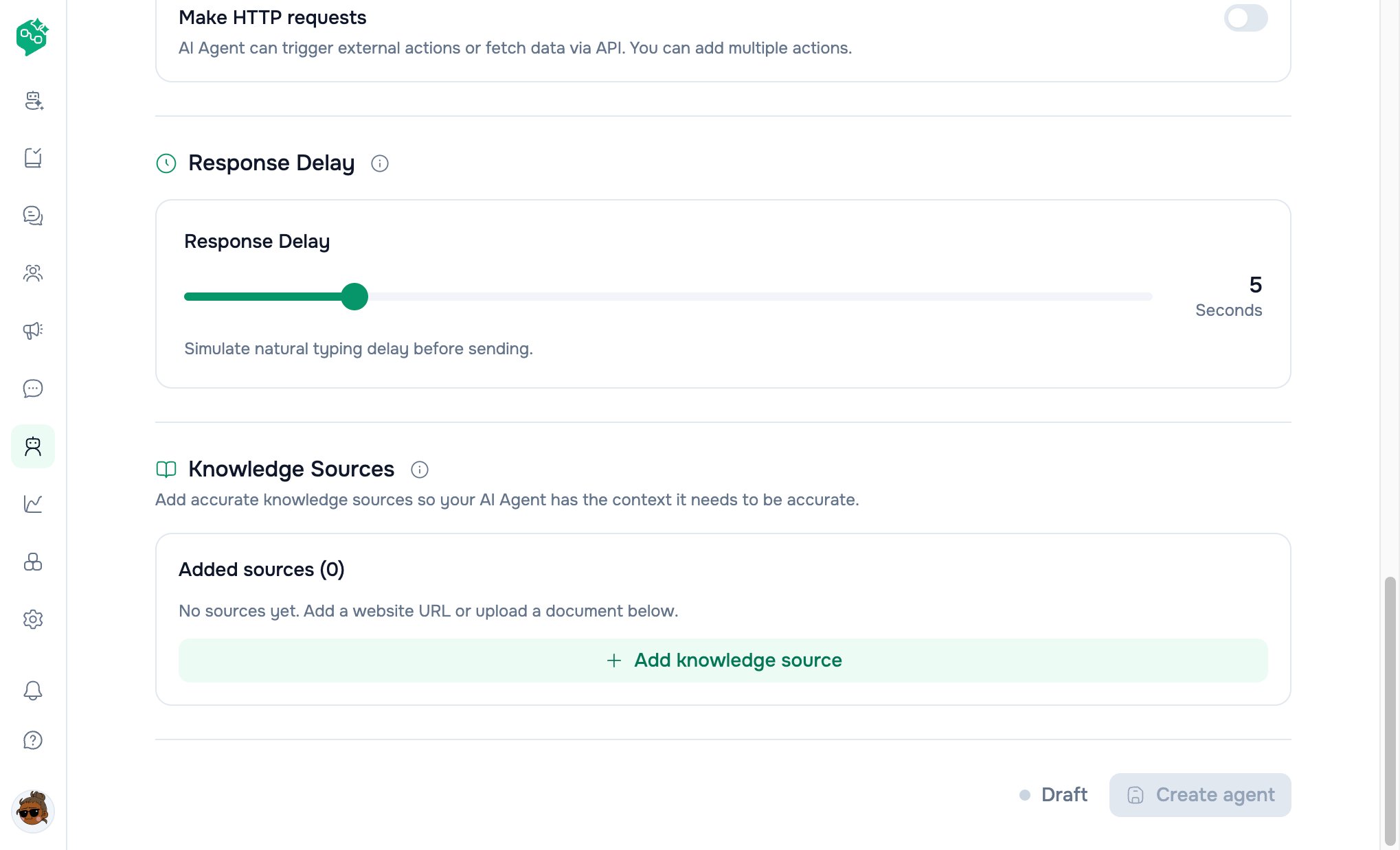
Give agents accurate answers from **files** and **websites**, then validate in the **Test AI Agent** sandbox before customers see replies.
**Where:** **Train AI Agent** / **Edit AI Agent** form → **Knowledge Sources** section + **Test AI Agent** panel
***
## Quick reference
| Task | Where |
| ----------------- | ---------------------------------------------------- |
| Add file | **Add knowledge source** → **Add file** |
| Add website | **Add knowledge source** → **Add website** |
| Remove source | Trash icon on row |
| Manual resync | Refresh icon (edit mode, after save) |
| Test replies | **Test AI Agent** panel — type + send |
| View sources used | Test replies include retrieval **sources** (backend) |
***
## Why knowledge matters
Banner on form and detail:
> *“Want your AI Agent to respond more accurately? Add accurate knowledge sources…”*
The model uses **retrieved snippets** from your sources for factual answers — not just instructions.
Update knowledge after every **pricing**, **policy**, or **product** change.
 ***
## Add knowledge source drawer
**Button:** **Add knowledge source** → drawer **“Add AI Knowledge Source”**
### Shared fields
| Field | Notes |
| -------- | ------------------------------------------ |
| **Name** | Label in list (e.g. `Returns policy 2024`) |
### Option A: File
| Rule | Value |
| ------------------- | --------------------------------------------------------------- |
| Max files per batch | **5** |
| Max per file | **1 MB** |
| Max combined batch | **1 MB** total |
| Allowed types | PDF, TXT, MD, CSV, DOCX, PPTX, PPSX, JPEG, PNG, BMP, WEBP, TIFF |
Upload flow uploads to workspace storage → attaches `file_id` on save.
### Option B: Website
| Field | Purpose |
| ------------------- | -------------------------------- |
| **Website URL** | Starting URL to crawl |
| **Resync schedule** | Never · Daily · Weekly · Monthly |
| **Resync time** | Time of day (when not Never) |
| **Day of week** | Weekly schedule |
| **Day of month** | Monthly schedule (days 1–28) |
#### Advanced crawl settings
| Setting | Default | Purpose |
| ---------------------- | ------- | --------------------------- |
| **Load sitemap** | On | Discover pages from sitemap |
| **Max crawling depth** | 3 | Link levels from start URL |
| **Additional URLs** | Up to 5 | Extra seeds |
| **Include globs** | — | Only crawl matching paths |
| **Exclude globs** | — | Skip matching paths |
Path filter docs link in UI points to crawl path filter documentation.
***
## Source list (after add)
Each row shows:
| Type | Display |
| ----------- | --------------------------------------- |
| **File** | Filename, size |
| **Website** | URL + resync schedule label |
| **Status** | `ready` · `syncing` · `error` |
| **Resync** | Refresh button when editing saved agent |
| **Remove** | Delete from agent config |
**Added sources (N)** counter on form.
On save (create or edit), sources sync to backend indexing pipeline.
***
## Rate limits (fair use)
Rolling **24-hour** window per workspace:
| Limit | Default | Error message theme |
| ------------------------------------------ | ------- | --------------------------------- |
| Knowledge source **changes** per workspace | 50/day | Wait 24h or reduce changes |
| **Crawl/resync** per source | 50/day | Wait before resyncing same source |
If customer hits limit, wait or contact support for enterprise limits.
***
## How retrieval works (conceptual)
```text theme={null}
Customer question
→ hybrid search over indexed chunks for THIS agent
→ top snippets injected into prompt
→ model answers with [Source: name] style citations in prompt guidance
```
Conversation history (recent messages) is included separately from knowledge files.
**Test mode** returns `sources` array with heading, content, score for debugging.
***
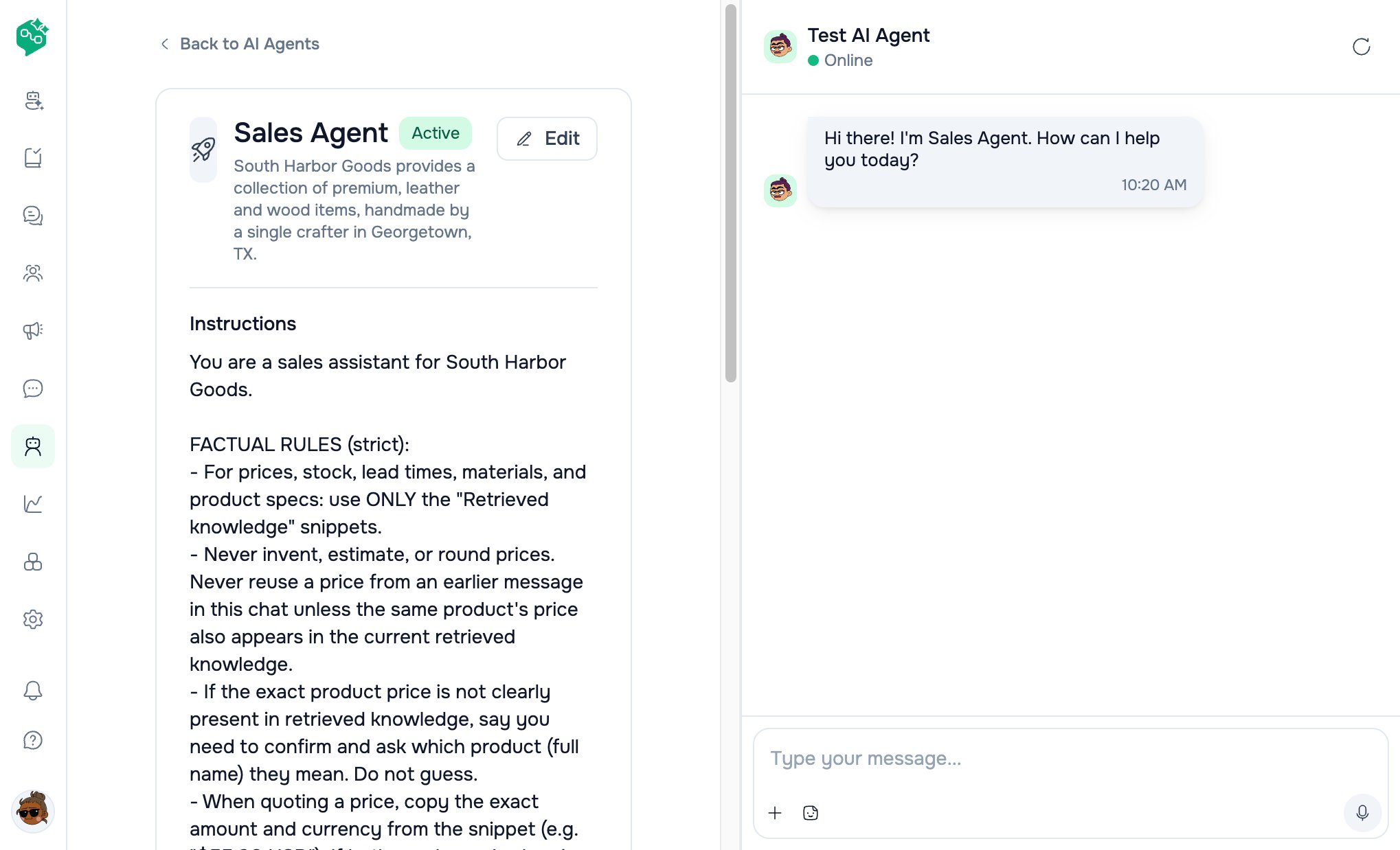
## Test AI Agent panel
Available on:
* **Create / Edit** form (side panel / mobile drawer)
* **Agent detail** page (**Test AI Agent** button)
***
## Add knowledge source drawer
**Button:** **Add knowledge source** → drawer **“Add AI Knowledge Source”**
### Shared fields
| Field | Notes |
| -------- | ------------------------------------------ |
| **Name** | Label in list (e.g. `Returns policy 2024`) |
### Option A: File
| Rule | Value |
| ------------------- | --------------------------------------------------------------- |
| Max files per batch | **5** |
| Max per file | **1 MB** |
| Max combined batch | **1 MB** total |
| Allowed types | PDF, TXT, MD, CSV, DOCX, PPTX, PPSX, JPEG, PNG, BMP, WEBP, TIFF |
Upload flow uploads to workspace storage → attaches `file_id` on save.
### Option B: Website
| Field | Purpose |
| ------------------- | -------------------------------- |
| **Website URL** | Starting URL to crawl |
| **Resync schedule** | Never · Daily · Weekly · Monthly |
| **Resync time** | Time of day (when not Never) |
| **Day of week** | Weekly schedule |
| **Day of month** | Monthly schedule (days 1–28) |
#### Advanced crawl settings
| Setting | Default | Purpose |
| ---------------------- | ------- | --------------------------- |
| **Load sitemap** | On | Discover pages from sitemap |
| **Max crawling depth** | 3 | Link levels from start URL |
| **Additional URLs** | Up to 5 | Extra seeds |
| **Include globs** | — | Only crawl matching paths |
| **Exclude globs** | — | Skip matching paths |
Path filter docs link in UI points to crawl path filter documentation.
***
## Source list (after add)
Each row shows:
| Type | Display |
| ----------- | --------------------------------------- |
| **File** | Filename, size |
| **Website** | URL + resync schedule label |
| **Status** | `ready` · `syncing` · `error` |
| **Resync** | Refresh button when editing saved agent |
| **Remove** | Delete from agent config |
**Added sources (N)** counter on form.
On save (create or edit), sources sync to backend indexing pipeline.
***
## Rate limits (fair use)
Rolling **24-hour** window per workspace:
| Limit | Default | Error message theme |
| ------------------------------------------ | ------- | --------------------------------- |
| Knowledge source **changes** per workspace | 50/day | Wait 24h or reduce changes |
| **Crawl/resync** per source | 50/day | Wait before resyncing same source |
If customer hits limit, wait or contact support for enterprise limits.
***
## How retrieval works (conceptual)
```text theme={null}
Customer question
→ hybrid search over indexed chunks for THIS agent
→ top snippets injected into prompt
→ model answers with [Source: name] style citations in prompt guidance
```
Conversation history (recent messages) is included separately from knowledge files.
**Test mode** returns `sources` array with heading, content, score for debugging.
***
## Test AI Agent panel
Available on:
* **Create / Edit** form (side panel / mobile drawer)
* **Agent detail** page (**Test AI Agent** button)
 ### UI behavior
| Element | Purpose |
| ------------------- | ------------------------------------------------------- |
| Chat bubbles | User (outgoing style) vs assistant (incoming) |
| Welcome line | From `welcome_message` if set, else agent name greeting |
| Input + send | Type customer questions |
| **Reset** | Clear test conversation |
| Mic / sticker icons | Visual parity with Chat (test only) |
### What to test
| Category | Example messages |
| ------------------- | ------------------------------------------------------- |
| FAQ | *“What are your hours?”* |
| Policy edge | *“Can I return worn shoes?”* |
| Escalation | *“I want to speak to a manager”* |
| Language | Customer language you support |
| Hallucination check | Obscure SKU not in knowledge — should admit uncertainty |
| Actions | Phrasing that should trigger assign/label rules |
**Test does not** send WhatsApp/Messenger messages — sandbox only.
### After failed test
Error toast; last user message restored to input for retry.
***
## Knowledge status badges
| Status | Meaning |
| ----------- | ------------------------ |
| **ready** | Indexed and searchable |
| **syncing** | Crawl/upload in progress |
| **error** | Fix URL/file; try resync |
Manual **Resync** queues a new ingest (subject to rate limits).
***
## Example: Harbor Legal knowledge stack
| Source | Type | Resync |
| --------------------- | -------- | -------------------- |
| `Intake FAQ` | PDF file | — |
| `harborlegal.com/faq` | Website | Weekly, Monday 00:00 |
| `Fee schedule` | DOCX | — |
Test: *“Do you handle immigration?”* → should cite FAQ, not invent practice areas.
***
## Best practices
1. **One topic per file** when possible — easier to update
2. **Exclude** blog/noise URLs with exclude globs
3. **Weekly resync** for pricing pages; **monthly** for static policies
4. **Re-test** after every knowledge edit
5. **Don’t upload** huge dumps — stay within 1 MB batches; split logically
6. **Instructions** repeat what knowledge cannot enforce (tone, legal boundaries)
***
## Troubleshooting
| Issue | Fix |
| ---------------------- | ----------------------------------------------------- |
| Upload rejected | Check 1 MB limit and file type list |
| Website stuck syncing | Valid public URL; check robots; retry resync tomorrow |
| Bot invents facts | Add/fix knowledge; tighten instructions |
| Test works, live fails | Thread assigned to agent? Agent **Active**? |
| Rate limit 429 | Wait 24 hours |
| No resync button | Save agent first (edit mode with document id) |
***
## Related docs
* [Creating & training agents](/ai-agents/creating-and-training-agents)
* [AI Agents overview](/ai-agents/ai-agents-overview)
* [Assigning agents in Chat](/ai-agents/assigning-agents-in-chat)
* [AI Agents FAQ](/ai-agents/ai-agents-faq)
### UI behavior
| Element | Purpose |
| ------------------- | ------------------------------------------------------- |
| Chat bubbles | User (outgoing style) vs assistant (incoming) |
| Welcome line | From `welcome_message` if set, else agent name greeting |
| Input + send | Type customer questions |
| **Reset** | Clear test conversation |
| Mic / sticker icons | Visual parity with Chat (test only) |
### What to test
| Category | Example messages |
| ------------------- | ------------------------------------------------------- |
| FAQ | *“What are your hours?”* |
| Policy edge | *“Can I return worn shoes?”* |
| Escalation | *“I want to speak to a manager”* |
| Language | Customer language you support |
| Hallucination check | Obscure SKU not in knowledge — should admit uncertainty |
| Actions | Phrasing that should trigger assign/label rules |
**Test does not** send WhatsApp/Messenger messages — sandbox only.
### After failed test
Error toast; last user message restored to input for retry.
***
## Knowledge status badges
| Status | Meaning |
| ----------- | ------------------------ |
| **ready** | Indexed and searchable |
| **syncing** | Crawl/upload in progress |
| **error** | Fix URL/file; try resync |
Manual **Resync** queues a new ingest (subject to rate limits).
***
## Example: Harbor Legal knowledge stack
| Source | Type | Resync |
| --------------------- | -------- | -------------------- |
| `Intake FAQ` | PDF file | — |
| `harborlegal.com/faq` | Website | Weekly, Monday 00:00 |
| `Fee schedule` | DOCX | — |
Test: *“Do you handle immigration?”* → should cite FAQ, not invent practice areas.
***
## Best practices
1. **One topic per file** when possible — easier to update
2. **Exclude** blog/noise URLs with exclude globs
3. **Weekly resync** for pricing pages; **monthly** for static policies
4. **Re-test** after every knowledge edit
5. **Don’t upload** huge dumps — stay within 1 MB batches; split logically
6. **Instructions** repeat what knowledge cannot enforce (tone, legal boundaries)
***
## Troubleshooting
| Issue | Fix |
| ---------------------- | ----------------------------------------------------- |
| Upload rejected | Check 1 MB limit and file type list |
| Website stuck syncing | Valid public URL; check robots; retry resync tomorrow |
| Bot invents facts | Add/fix knowledge; tighten instructions |
| Test works, live fails | Thread assigned to agent? Agent **Active**? |
| Rate limit 429 | Wait 24 hours |
| No resync button | Save agent first (edit mode with document id) |
***
## Related docs
* [Creating & training agents](/ai-agents/creating-and-training-agents)
* [AI Agents overview](/ai-agents/ai-agents-overview)
* [Assigning agents in Chat](/ai-agents/assigning-agents-in-chat)
* [AI Agents FAQ](/ai-agents/ai-agents-faq)