> ## Documentation Index
> Fetch the complete documentation index at: https://docs.vendschat.com/llms.txt
> Use this file to discover all available pages before exploring further.
# Creating & training AI Agents
> Step-by-step guide to building a customer-facing bot — from template pick through instructions, actions, and save.
Step-by-step guide to building a customer-facing bot — from template pick through instructions, actions, and save.
**Paths:**
* Create: `/ai-agents/create` (optional `?template=receptionist|sales|support|custom`)
* Edit: `/ai-agents/{id}/edit`
* Form title: **Train AI Agent** (create) · **Edit AI Agent** (edit)
***
## Quick reference
| Section in form | What it controls |
| --------------------- | ------------------------------------ |
| **Configuration** | Name (1–60 chars), description |
| **Instructions** | Role, tone, rules (max 8,000 chars) |
| **Actions** | What the bot may do in conversations |
| **Response Delay** | 0–30 seconds before replying |
| **Knowledge Sources** | Files + websites for RAG |
| **Test AI Agent** | Sandbox chat (right panel / drawer) |
***
## Start from template or scratch
### Browse templates
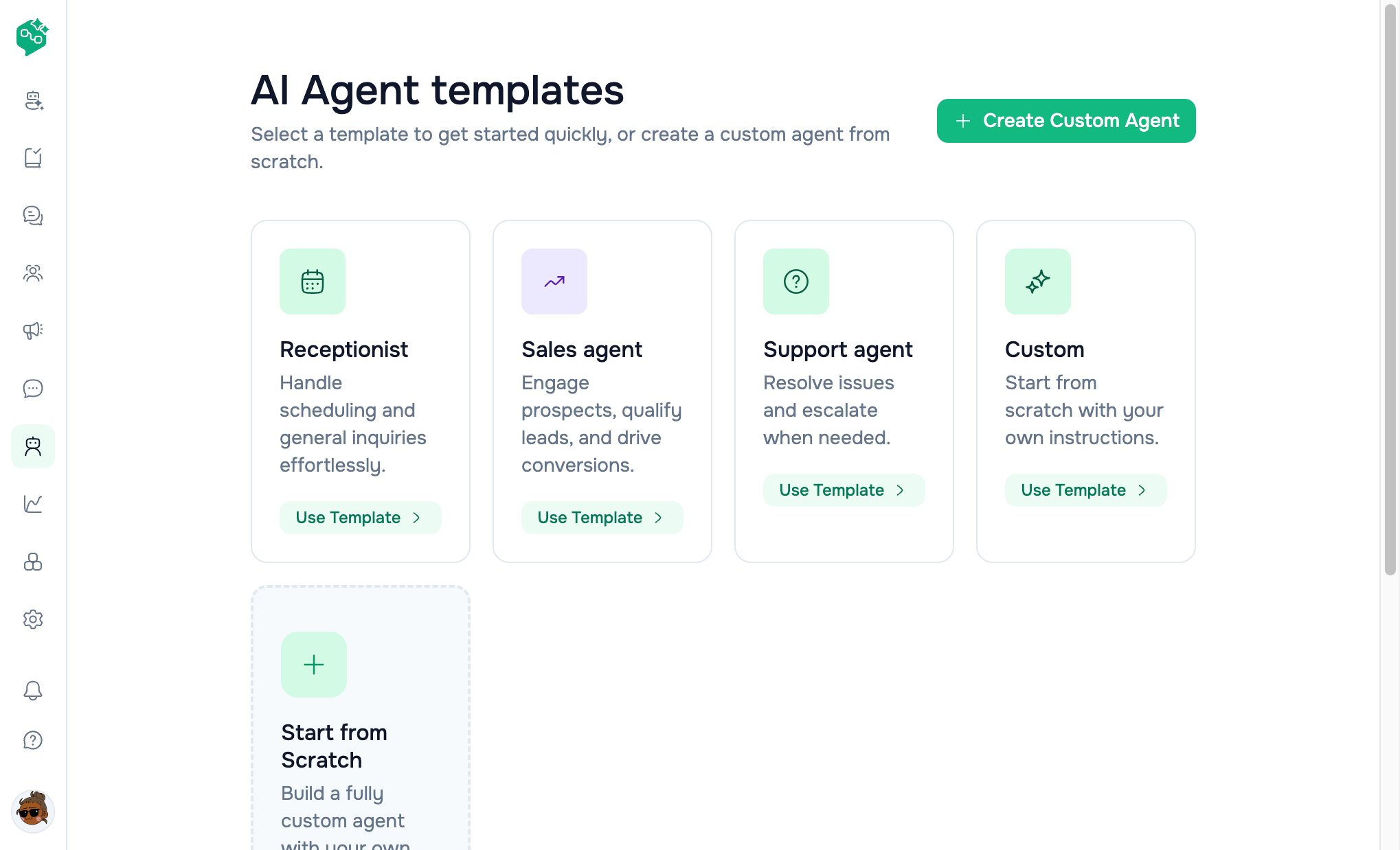
**AI Agents** → **Browse templates** → `/ai-agents/templates`
| Template | Default instruction theme |
| ----------------- | --------------------------------------------- |
| **Receptionist** | Friendly scheduling and common questions |
| **Sales agent** | Qualify leads, product answers, next steps |
| **Support agent** | Patient troubleshooting, escalate when needed |
| **Custom** | Empty — you write everything |
Click template card → create form with `?template=` query.
 ### Create custom
**AI Agents** → **Create AI Agent** → `/ai-agents/create`
Templates page also has **Create Custom Agent** (no template hint).
***
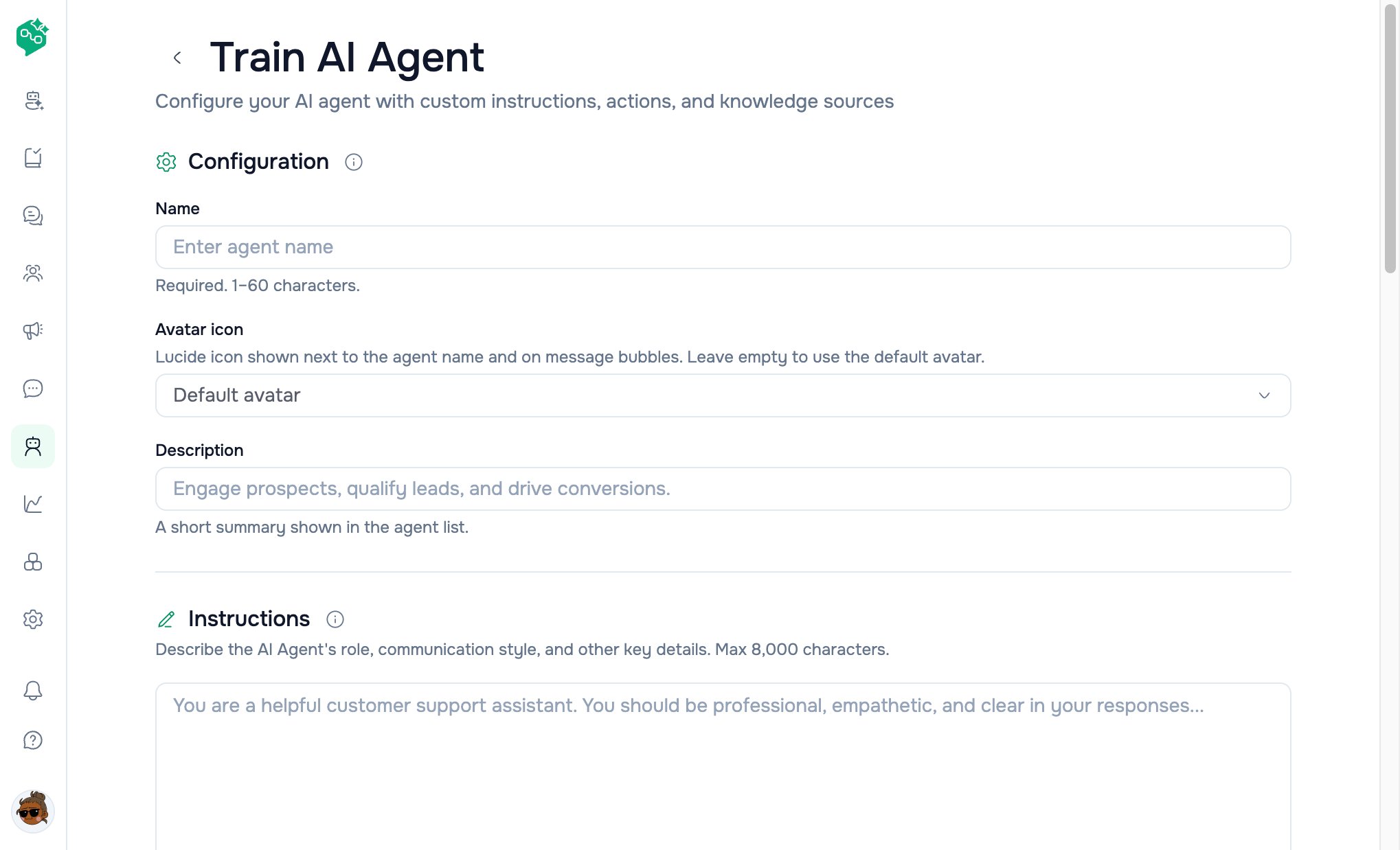
## Configuration
| Field | Required | Limits |
| --------------- | -------- | ------------------------------------------------------ |
| **Name** | Yes | 1–60 characters — shown on cards and assignee dropdown |
| **Description** | No | Short summary on list + detail header |
*Example names:* `Night Support Bot`, `Sales Qualifier`, `Returns Assistant`
### Create custom
**AI Agents** → **Create AI Agent** → `/ai-agents/create`
Templates page also has **Create Custom Agent** (no template hint).
***
## Configuration
| Field | Required | Limits |
| --------------- | -------- | ------------------------------------------------------ |
| **Name** | Yes | 1–60 characters — shown on cards and assignee dropdown |
| **Description** | No | Short summary on list + detail header |
*Example names:* `Night Support Bot`, `Sales Qualifier`, `Returns Assistant`
 ***
## Instructions
The core personality and policy block — sent with **every** customer reply.
| UI | Detail |
| ----------- | ---------------------------------------------------- |
| Label | **Instructions** |
| Help | Role, tone, communication style — clear and specific |
| Limit | **8,000 characters** (counter shown) |
| Placeholder | Support assistant example |
### Writing effective instructions
1. **Role** — *“You are the front desk for NovaFit Gym.”*
2. **Boundaries** — *“Never give medical advice.”*
3. **Tone** — *“Warm, concise, use the customer’s first name when known.”*
4. **Escalation** — *“If angry or asking for refund over \$200, say you’ll connect a human.”*
5. **Language** — *“Reply in the same language the customer uses.”*
> Garbage in, garbage out. Update instructions when policies change.
***
## Actions
**Section:** *“Agent actions that take place during a conversation.”*
Toggle **on** only actions you trust. Each enabled action has an **instruction** field — plain-language rules the model follows.
| Action | Description (in UI) | Example instruction |
| --------------------------- | ------------------------------ | ------------------------------------------- |
| **Close conversation** | Close when guidelines met | Only close after customer confirms resolved |
| **Assign to agent or team** | Route to human, agent, or team | Billing team for payment issues |
| **Update Contact fields** | Sync fields from chat | Update name when customer provides it |
| **Update Labels** | Add/remove labels on contact | Tag `VIP` when spend mentioned |
| **Add comments** | Internal notes for team | Summarize + suggest next step on escalation |
| **Make HTTP requests** | Call external APIs (multiple) | Order lookup by phone |
### HTTP request actions
When **Make HTTP requests** is enabled:
| Field per request | Purpose |
| ----------------- | ---------------------------------------------- |
| **Name** | Label (e.g. `Shopify order lookup`) |
| **Method** | GET, POST, PUT, DELETE, PATCH |
| **URL** | Endpoint |
| **Headers** | Key/value pairs |
| **Fields** | Parameters (name, type, description, required) |
Add multiple HTTP actions with **+**; remove per row.
**Note:** Actions are passed to the model as structured context. Enable conservatively and test in **Test AI Agent** before assigning live threads.
***
## Response delay
**Slider:** 0–30 **seconds**
**Why wait?** When customers send *“Hi”* then *“I have a question”*, a short delay lets the bot reply **once** with full context instead of twice instantly.
| Value | Use case |
| --------- | ---------------------------------- |
| **0** | Instant (high-volume FAQ) |
| **5** | Default — natural feel |
| **15–30** | Let customers finish typing bursts |
Shown on agent detail as *“Response delay: Ns”*.
***
## Save flow
| Mode | After save |
| ---------- | ------------------------------------- |
| **Create** | Redirects to `/ai-agents/{id}` detail |
| **Edit** | Returns to detail; shows saved state |
Footer shows **Saving…** / **Saved** / **Edits not saved**.
***
## Agent detail page (after create)
**Path:** `/ai-agents/{id}`
| Section | Content |
| --------------------- | ------------------------------------------ |
| Header | Name, status badge, description, **Edit** |
| **Instructions** | Full text (read-only) |
| Stats | Response delay, conversation count |
| **Actions** | Badges for enabled actions |
| **Knowledge sources** | List with status (ready / syncing / error) |
| **Test AI Agent** | Opens test panel |
***
## Edit & delete
| Action | Where | Effect |
| ------------ | --------------------- | ------------------------------------------------------------- |
| **Edit** | Detail or card ⋯ menu | `/ai-agents/{id}/edit` |
| **Pause** | List card switch off | Status → **Paused**; stops replies |
| **Activate** | Switch on | Status → **Active** |
| **Delete** | ⋯ menu → confirm | Removes agent; unassigns threads; clears default agent if set |
***
## Fields supported by API (not all in form yet)
These exist on the backend and may appear in API responses; dashboard form may not expose every field yet:
| Field | Purpose |
| -------------------------------------- | -------------------------------------------------- |
| `welcome_message` | First message when bot joins (shown in test panel) |
| `handover_triggers` | Keyword list on bot reply text for escalation |
| `mission`, `tone`, `language`, `model` | Extra prompt tuning |
| `default_ai_agent_id` (workspace) | Auto-assign new threads |
Co-Admin should describe **dashboard paths first**; mention API fields only when customers ask about advanced/coming-soon settings.
***
## Example: UrbanGear e-commerce
| Step | Action |
| ---- | ---------------------------------------------------------------------------- |
| 1 | Template **Sales agent** |
| 2 | Name `UrbanGear Sizing Helper` |
| 3 | Instructions: never promise delivery dates; link size chart |
| 4 | Knowledge: returns policy PDF + `/help/sizing` website (weekly resync) |
| 5 | Actions: **Update Labels** `Sizing question`; **Assign to team** for defects |
| 6 | Response delay: 5s |
| 7 | **Test AI Agent**: *“Do you have size 11 in black?”* |
| 8 | **Active** → assign in **Chat** on DMs |
***
## Troubleshooting
| Issue | Check |
| ----------------------- | ------------------------------------------------------- |
| Can’t create agent | **Growth+** plan; workspace permissions |
| Name rejected | 1–60 characters |
| Instructions won’t save | Under 8,000 characters |
| Actions seem ignored | Test in sandbox; instructions must describe when to use |
| No templates | `/ai-agents/templates` — workspace must load |
***
## Related docs
* [AI Agents overview](/ai-agents/ai-agents-overview)
* [Knowledge sources & testing](/ai-agents/knowledge-sources-and-testing)
* [Assigning agents in Chat](/ai-agents/assigning-agents-in-chat)
* [AI Agents FAQ](/ai-agents/ai-agents-faq)
***
## Instructions
The core personality and policy block — sent with **every** customer reply.
| UI | Detail |
| ----------- | ---------------------------------------------------- |
| Label | **Instructions** |
| Help | Role, tone, communication style — clear and specific |
| Limit | **8,000 characters** (counter shown) |
| Placeholder | Support assistant example |
### Writing effective instructions
1. **Role** — *“You are the front desk for NovaFit Gym.”*
2. **Boundaries** — *“Never give medical advice.”*
3. **Tone** — *“Warm, concise, use the customer’s first name when known.”*
4. **Escalation** — *“If angry or asking for refund over \$200, say you’ll connect a human.”*
5. **Language** — *“Reply in the same language the customer uses.”*
> Garbage in, garbage out. Update instructions when policies change.
***
## Actions
**Section:** *“Agent actions that take place during a conversation.”*
Toggle **on** only actions you trust. Each enabled action has an **instruction** field — plain-language rules the model follows.
| Action | Description (in UI) | Example instruction |
| --------------------------- | ------------------------------ | ------------------------------------------- |
| **Close conversation** | Close when guidelines met | Only close after customer confirms resolved |
| **Assign to agent or team** | Route to human, agent, or team | Billing team for payment issues |
| **Update Contact fields** | Sync fields from chat | Update name when customer provides it |
| **Update Labels** | Add/remove labels on contact | Tag `VIP` when spend mentioned |
| **Add comments** | Internal notes for team | Summarize + suggest next step on escalation |
| **Make HTTP requests** | Call external APIs (multiple) | Order lookup by phone |
### HTTP request actions
When **Make HTTP requests** is enabled:
| Field per request | Purpose |
| ----------------- | ---------------------------------------------- |
| **Name** | Label (e.g. `Shopify order lookup`) |
| **Method** | GET, POST, PUT, DELETE, PATCH |
| **URL** | Endpoint |
| **Headers** | Key/value pairs |
| **Fields** | Parameters (name, type, description, required) |
Add multiple HTTP actions with **+**; remove per row.
**Note:** Actions are passed to the model as structured context. Enable conservatively and test in **Test AI Agent** before assigning live threads.
***
## Response delay
**Slider:** 0–30 **seconds**
**Why wait?** When customers send *“Hi”* then *“I have a question”*, a short delay lets the bot reply **once** with full context instead of twice instantly.
| Value | Use case |
| --------- | ---------------------------------- |
| **0** | Instant (high-volume FAQ) |
| **5** | Default — natural feel |
| **15–30** | Let customers finish typing bursts |
Shown on agent detail as *“Response delay: Ns”*.
***
## Save flow
| Mode | After save |
| ---------- | ------------------------------------- |
| **Create** | Redirects to `/ai-agents/{id}` detail |
| **Edit** | Returns to detail; shows saved state |
Footer shows **Saving…** / **Saved** / **Edits not saved**.
***
## Agent detail page (after create)
**Path:** `/ai-agents/{id}`
| Section | Content |
| --------------------- | ------------------------------------------ |
| Header | Name, status badge, description, **Edit** |
| **Instructions** | Full text (read-only) |
| Stats | Response delay, conversation count |
| **Actions** | Badges for enabled actions |
| **Knowledge sources** | List with status (ready / syncing / error) |
| **Test AI Agent** | Opens test panel |
***
## Edit & delete
| Action | Where | Effect |
| ------------ | --------------------- | ------------------------------------------------------------- |
| **Edit** | Detail or card ⋯ menu | `/ai-agents/{id}/edit` |
| **Pause** | List card switch off | Status → **Paused**; stops replies |
| **Activate** | Switch on | Status → **Active** |
| **Delete** | ⋯ menu → confirm | Removes agent; unassigns threads; clears default agent if set |
***
## Fields supported by API (not all in form yet)
These exist on the backend and may appear in API responses; dashboard form may not expose every field yet:
| Field | Purpose |
| -------------------------------------- | -------------------------------------------------- |
| `welcome_message` | First message when bot joins (shown in test panel) |
| `handover_triggers` | Keyword list on bot reply text for escalation |
| `mission`, `tone`, `language`, `model` | Extra prompt tuning |
| `default_ai_agent_id` (workspace) | Auto-assign new threads |
Co-Admin should describe **dashboard paths first**; mention API fields only when customers ask about advanced/coming-soon settings.
***
## Example: UrbanGear e-commerce
| Step | Action |
| ---- | ---------------------------------------------------------------------------- |
| 1 | Template **Sales agent** |
| 2 | Name `UrbanGear Sizing Helper` |
| 3 | Instructions: never promise delivery dates; link size chart |
| 4 | Knowledge: returns policy PDF + `/help/sizing` website (weekly resync) |
| 5 | Actions: **Update Labels** `Sizing question`; **Assign to team** for defects |
| 6 | Response delay: 5s |
| 7 | **Test AI Agent**: *“Do you have size 11 in black?”* |
| 8 | **Active** → assign in **Chat** on DMs |
***
## Troubleshooting
| Issue | Check |
| ----------------------- | ------------------------------------------------------- |
| Can’t create agent | **Growth+** plan; workspace permissions |
| Name rejected | 1–60 characters |
| Instructions won’t save | Under 8,000 characters |
| Actions seem ignored | Test in sandbox; instructions must describe when to use |
| No templates | `/ai-agents/templates` — workspace must load |
***
## Related docs
* [AI Agents overview](/ai-agents/ai-agents-overview)
* [Knowledge sources & testing](/ai-agents/knowledge-sources-and-testing)
* [Assigning agents in Chat](/ai-agents/assigning-agents-in-chat)
* [AI Agents FAQ](/ai-agents/ai-agents-faq)