> ## Documentation Index
> Fetch the complete documentation index at: https://docs.vendschat.com/llms.txt
> Use this file to discover all available pages before exploring further.
# Customer AI Agents — overview
> AI Agents are customer-facing bots you train to reply on Chat threads — on-brand, from your knowledge, with optional handoff to humans.
**AI Agents** are customer-facing bots you train to reply on **Chat** threads — on-brand, from your knowledge, with optional handoff to humans.
**Who this is for:** Support leads, ops managers, and anyone asking Co-Admin *“How do I set up a bot?”*, *“Where are AI Agents?”*, or *“What’s the difference from Generate Reply?”*
**Main path:** Sidebar **AI Agents** → `/ai-agents`
 **Plan:** **Custom AI Agents** require **Growth** or **Advanced** (not **Starter**). See [billing — pricing](/billing/pricing-plans-reference).
***
## Quick reference
| Need | Where to go |
| ------------------------- | ----------------------------------------------------------- |
| List agents | **AI Agents** (`/ai-agents`) |
| Create agent | **Create AI Agent** → `/ai-agents/create` |
| Browse templates | **Browse templates** → `/ai-agents/templates` |
| Agent detail | Click card → `/ai-agents/{id}` |
| Edit agent | **Edit** → `/ai-agents/{id}/edit` |
| Test before live | **Test AI Agent** panel (create/edit/detail) |
| Assign to customer thread | **Chat** → recipient panel → **Assigned to** |
| Pause bot | Agent card **switch** off (Paused) |
| Draft for agents | **Generate Reply** in **Chat** composer (different feature) |
| Internal product help | **Co-Admin** (not a customer bot) |
***
## Three kinds of AI in Vendschat
| | **AI Agents** | **Generate Reply** | **Co-Admin** |
| ------------------------ | --------------------------------------------- | -------------------------- | ----------------------------------- |
| **Talks to** | Customers (automatically on assigned threads) | Helps your team draft | Helps your team use the product |
| **Where** | **AI Agents** + **Chat** assignment | **Chat** composer sparkle | Co-Admin chat |
| **Sends without human?** | Yes — when assigned & active | No — human clicks **Send** | N/A |
| **Knowledge** | Per-agent files + websites | Thread context + tones | Product docs + live workspace tools |
| **Plan** | Growth+ | Workspace setting | Included |
**Rule of thumb:** AI Agents = **automation**. Generate Reply = **speed with approval**. Co-Admin = **“How does Vendschat work?”**
Deep dive: [Composer & Generate Reply](/inbox/composer-generate-reply) · [Workspace Co-Admin](/co-admin/workspace-co-admin)
***
## Navigation map
```text theme={null}
Sidebar
└── AI Agents /ai-agents
├── Search agents ?q=...
├── Browse templates /ai-agents/templates
├── Create AI Agent /ai-agents/create
│ └── ?template=receptionist|sales|support|custom
├── Agent detail /ai-agents/{id}
└── Edit agent /ai-agents/{id}/edit
Chat (customer inbox)
└── Recipient panel
└── Assigned to user · team · AI Agent
```
| Entry point | Lands on |
| -------------------------------- | --------------------------------- |
| Sidebar **AI Agents** | `/ai-agents` |
| Empty state **Browse templates** | `/ai-agents/templates` |
| Template card click | `/ai-agents/create?template={id}` |
| **Chat** assignee dropdown | Search *users, teams, AI agents* |
**Access:** Users need page permission for **AI Agents** (same pattern as other sidebar items). **Chat** assignment shows only **active** agents from the workspace.
***
## Example: PetPals Veterinary
**Dr. Sam** wants after-hours triage without diagnosing on WhatsApp.
| Setting | Choice |
| -------------- | ------------------------------------------------------------------------------ |
| Template | **Support agent** |
| Instructions | Never diagnose; suggest emergency vet for breathing issues; book mornings only |
| Knowledge | Clinic services page + FAQ PDF |
| Actions | **Add comments** on escalation; **Assign to team** for clinical staff |
| Response delay | 5 seconds (batch rapid messages) |
| Status | **Active** nights; **Paused** when clinic is fully staffed |
| Assignment | **Chat** → assign **PetPals Night Bot** per thread, or workspace default agent |
Day staff handle complex cases; the bot answers *“What are your hours?”* and *“Where are you located?”*
***
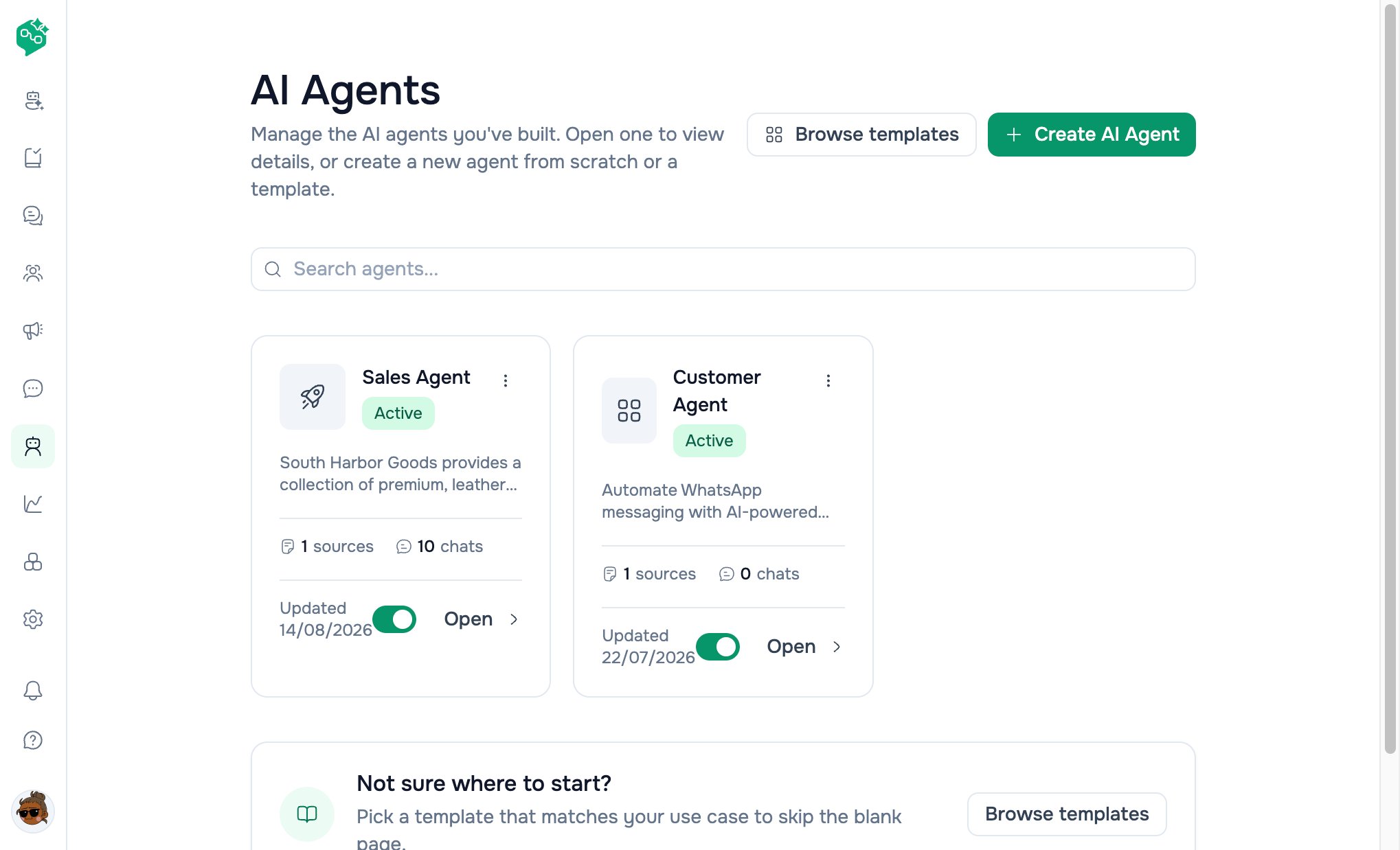
## AI Agents list page
**Title:** *AI Agents* — *“Manage the AI agents you've built…”*
### Header actions
| Button | Path |
| -------------------- | ---------------------- |
| **Browse templates** | `/ai-agents/templates` |
| **Create AI Agent** | `/ai-agents/create` |
### Search
*“Search agents…”* — debounced; updates URL `?q=` and refetches list.
### Agent cards
Each card shows:
| Element | Meaning |
| ------------------- | ------------------------------------------------------------------ |
| Name + status badge | **Active** (green) · **Paused** (warning) · **Archived** (neutral) |
| Description | Short summary |
| **⋯ menu** | **Edit** · **Delete** |
| Sources count | Knowledge sources attached |
| Chats count | Conversations handled |
| **Updated** | Relative time |
| **Switch** | Toggle **Active** / **Paused** (disabled when archived) |
| **Open** | Agent detail page |
### Empty state
*“No AI agents yet”* — **Browse templates** + **Create AI Agent**.
### Footer tip
*“Not sure where to start? Pick a template…”* → **Browse templates**
***
## How AI Agents work in Chat
```text theme={null}
Customer messages on WhatsApp / Messenger / Instagram
↓
Thread in Chat (shared inbox)
↓
Assigned to AI Agent? ──no──→ Human handles (or unassigned)
│
yes
↓
Response delay (0–30s) batches rapid messages
↓
Retrieve knowledge + conversation context
↓
Model generates reply → sent to customer on channel
│
├── Handover triggered → internal note, human takes over
└── Human assigns self → bot stops (human_takeover)
```
* Bot replies **only** on threads **assigned to that agent**
* **Paused** or **Archived** agents do not process new replies
* Assigning a **human** or **team** removes bot control (or sets human takeover while keeping agent link)
Deep dive: [Assigning agents in Chat](/ai-agents/assigning-agents-in-chat)
***
## Templates
**Path:** `/ai-agents/templates`
| Template ID | Name | Best for |
| -------------- | ------------- | ------------------------------------- |
| `receptionist` | Receptionist | Scheduling, hours, general inquiries |
| `sales` | Sales agent | Lead qualification, product questions |
| `support` | Support agent | Troubleshooting, escalation |
| `custom` | Custom | Blank instructions |
Click a template → `/ai-agents/create?template={id}` with starter instructions pre-filled.
Deep dive: [Creating & training agents](/ai-agents/creating-and-training-agents)
***
## Plan requirements
| Feature | Starter | Growth | Advanced |
| ---------------------------- | ------- | ------ | -------- |
| Custom AI Agents | ❌ | ✅ | ✅ |
| Knowledge (files + websites) | ❌ | ✅ | ✅ |
| HTTP request actions | ❌ | ✅ | ✅ |
| Test AI Agent panel | ❌ | ✅ | ✅ |
**Upgrade:** **Settings → Organization → Billing & Usage → Plans**
***
## Lifecycle statuses
| Status | UI | Behavior |
| ------------ | ------------------------------ | ----------------------------------------------- |
| **Active** | Green badge; switch on | Replies on assigned threads |
| **Paused** | Warning badge; switch off | No new automated replies; assignment can remain |
| **Archived** | Neutral badge; switch disabled | Retired; history kept |
Delete removes agent, clears thread assignments, clears workspace default if set.
***
## Co-Admin & live data
| Customer asks… | Co-Admin approach |
| --------------------------------- | -------------------------------------------------------- |
| “How many AI agents do we have?” | Workspace overview tool → `ai_agents.total`, `by_status` |
| “How do I assign an AI Agent?” | [Assigning in Chat](/ai-agents/assigning-agents-in-chat) |
| “Difference from Generate Reply?” | This doc — three kinds of AI table |
| “List our webhooks” | Integrations tool (separate from AI Agents) |
Co-Admin uses the user’s **current workspace**.
***
## Growth path
| Stage | Approach |
| ---------- | ------------------------------------------------------------------- |
| **Week 1** | Manual **Chat** + **Generate Reply** for drafts |
| **Week 2** | One **Support** template agent + knowledge FAQ |
| **Week 3** | Assign bot to after-hours threads; humans by day |
| **Scale** | Multiple agents (sales vs support), labels + actions, default agent |
***
## Related docs
* [Creating & training agents](/ai-agents/creating-and-training-agents)
* [Assigning agents in Chat](/ai-agents/assigning-agents-in-chat)
* [Knowledge sources & testing](/ai-agents/knowledge-sources-and-testing)
* [AI Agents FAQ](/ai-agents/ai-agents-faq)
* [Chat inbox overview](/inbox/chat-inbox-overview)
* [Assignments & teams](/inbox/assignments-and-teams)
* [Billing — plans](/billing/plans-and-usage)
**Plan:** **Custom AI Agents** require **Growth** or **Advanced** (not **Starter**). See [billing — pricing](/billing/pricing-plans-reference).
***
## Quick reference
| Need | Where to go |
| ------------------------- | ----------------------------------------------------------- |
| List agents | **AI Agents** (`/ai-agents`) |
| Create agent | **Create AI Agent** → `/ai-agents/create` |
| Browse templates | **Browse templates** → `/ai-agents/templates` |
| Agent detail | Click card → `/ai-agents/{id}` |
| Edit agent | **Edit** → `/ai-agents/{id}/edit` |
| Test before live | **Test AI Agent** panel (create/edit/detail) |
| Assign to customer thread | **Chat** → recipient panel → **Assigned to** |
| Pause bot | Agent card **switch** off (Paused) |
| Draft for agents | **Generate Reply** in **Chat** composer (different feature) |
| Internal product help | **Co-Admin** (not a customer bot) |
***
## Three kinds of AI in Vendschat
| | **AI Agents** | **Generate Reply** | **Co-Admin** |
| ------------------------ | --------------------------------------------- | -------------------------- | ----------------------------------- |
| **Talks to** | Customers (automatically on assigned threads) | Helps your team draft | Helps your team use the product |
| **Where** | **AI Agents** + **Chat** assignment | **Chat** composer sparkle | Co-Admin chat |
| **Sends without human?** | Yes — when assigned & active | No — human clicks **Send** | N/A |
| **Knowledge** | Per-agent files + websites | Thread context + tones | Product docs + live workspace tools |
| **Plan** | Growth+ | Workspace setting | Included |
**Rule of thumb:** AI Agents = **automation**. Generate Reply = **speed with approval**. Co-Admin = **“How does Vendschat work?”**
Deep dive: [Composer & Generate Reply](/inbox/composer-generate-reply) · [Workspace Co-Admin](/co-admin/workspace-co-admin)
***
## Navigation map
```text theme={null}
Sidebar
└── AI Agents /ai-agents
├── Search agents ?q=...
├── Browse templates /ai-agents/templates
├── Create AI Agent /ai-agents/create
│ └── ?template=receptionist|sales|support|custom
├── Agent detail /ai-agents/{id}
└── Edit agent /ai-agents/{id}/edit
Chat (customer inbox)
└── Recipient panel
└── Assigned to user · team · AI Agent
```
| Entry point | Lands on |
| -------------------------------- | --------------------------------- |
| Sidebar **AI Agents** | `/ai-agents` |
| Empty state **Browse templates** | `/ai-agents/templates` |
| Template card click | `/ai-agents/create?template={id}` |
| **Chat** assignee dropdown | Search *users, teams, AI agents* |
**Access:** Users need page permission for **AI Agents** (same pattern as other sidebar items). **Chat** assignment shows only **active** agents from the workspace.
***
## Example: PetPals Veterinary
**Dr. Sam** wants after-hours triage without diagnosing on WhatsApp.
| Setting | Choice |
| -------------- | ------------------------------------------------------------------------------ |
| Template | **Support agent** |
| Instructions | Never diagnose; suggest emergency vet for breathing issues; book mornings only |
| Knowledge | Clinic services page + FAQ PDF |
| Actions | **Add comments** on escalation; **Assign to team** for clinical staff |
| Response delay | 5 seconds (batch rapid messages) |
| Status | **Active** nights; **Paused** when clinic is fully staffed |
| Assignment | **Chat** → assign **PetPals Night Bot** per thread, or workspace default agent |
Day staff handle complex cases; the bot answers *“What are your hours?”* and *“Where are you located?”*
***
## AI Agents list page
**Title:** *AI Agents* — *“Manage the AI agents you've built…”*
### Header actions
| Button | Path |
| -------------------- | ---------------------- |
| **Browse templates** | `/ai-agents/templates` |
| **Create AI Agent** | `/ai-agents/create` |
### Search
*“Search agents…”* — debounced; updates URL `?q=` and refetches list.
### Agent cards
Each card shows:
| Element | Meaning |
| ------------------- | ------------------------------------------------------------------ |
| Name + status badge | **Active** (green) · **Paused** (warning) · **Archived** (neutral) |
| Description | Short summary |
| **⋯ menu** | **Edit** · **Delete** |
| Sources count | Knowledge sources attached |
| Chats count | Conversations handled |
| **Updated** | Relative time |
| **Switch** | Toggle **Active** / **Paused** (disabled when archived) |
| **Open** | Agent detail page |
### Empty state
*“No AI agents yet”* — **Browse templates** + **Create AI Agent**.
### Footer tip
*“Not sure where to start? Pick a template…”* → **Browse templates**
***
## How AI Agents work in Chat
```text theme={null}
Customer messages on WhatsApp / Messenger / Instagram
↓
Thread in Chat (shared inbox)
↓
Assigned to AI Agent? ──no──→ Human handles (or unassigned)
│
yes
↓
Response delay (0–30s) batches rapid messages
↓
Retrieve knowledge + conversation context
↓
Model generates reply → sent to customer on channel
│
├── Handover triggered → internal note, human takes over
└── Human assigns self → bot stops (human_takeover)
```
* Bot replies **only** on threads **assigned to that agent**
* **Paused** or **Archived** agents do not process new replies
* Assigning a **human** or **team** removes bot control (or sets human takeover while keeping agent link)
Deep dive: [Assigning agents in Chat](/ai-agents/assigning-agents-in-chat)
***
## Templates
**Path:** `/ai-agents/templates`
| Template ID | Name | Best for |
| -------------- | ------------- | ------------------------------------- |
| `receptionist` | Receptionist | Scheduling, hours, general inquiries |
| `sales` | Sales agent | Lead qualification, product questions |
| `support` | Support agent | Troubleshooting, escalation |
| `custom` | Custom | Blank instructions |
Click a template → `/ai-agents/create?template={id}` with starter instructions pre-filled.
Deep dive: [Creating & training agents](/ai-agents/creating-and-training-agents)
***
## Plan requirements
| Feature | Starter | Growth | Advanced |
| ---------------------------- | ------- | ------ | -------- |
| Custom AI Agents | ❌ | ✅ | ✅ |
| Knowledge (files + websites) | ❌ | ✅ | ✅ |
| HTTP request actions | ❌ | ✅ | ✅ |
| Test AI Agent panel | ❌ | ✅ | ✅ |
**Upgrade:** **Settings → Organization → Billing & Usage → Plans**
***
## Lifecycle statuses
| Status | UI | Behavior |
| ------------ | ------------------------------ | ----------------------------------------------- |
| **Active** | Green badge; switch on | Replies on assigned threads |
| **Paused** | Warning badge; switch off | No new automated replies; assignment can remain |
| **Archived** | Neutral badge; switch disabled | Retired; history kept |
Delete removes agent, clears thread assignments, clears workspace default if set.
***
## Co-Admin & live data
| Customer asks… | Co-Admin approach |
| --------------------------------- | -------------------------------------------------------- |
| “How many AI agents do we have?” | Workspace overview tool → `ai_agents.total`, `by_status` |
| “How do I assign an AI Agent?” | [Assigning in Chat](/ai-agents/assigning-agents-in-chat) |
| “Difference from Generate Reply?” | This doc — three kinds of AI table |
| “List our webhooks” | Integrations tool (separate from AI Agents) |
Co-Admin uses the user’s **current workspace**.
***
## Growth path
| Stage | Approach |
| ---------- | ------------------------------------------------------------------- |
| **Week 1** | Manual **Chat** + **Generate Reply** for drafts |
| **Week 2** | One **Support** template agent + knowledge FAQ |
| **Week 3** | Assign bot to after-hours threads; humans by day |
| **Scale** | Multiple agents (sales vs support), labels + actions, default agent |
***
## Related docs
* [Creating & training agents](/ai-agents/creating-and-training-agents)
* [Assigning agents in Chat](/ai-agents/assigning-agents-in-chat)
* [Knowledge sources & testing](/ai-agents/knowledge-sources-and-testing)
* [AI Agents FAQ](/ai-agents/ai-agents-faq)
* [Chat inbox overview](/inbox/chat-inbox-overview)
* [Assignments & teams](/inbox/assignments-and-teams)
* [Billing — plans](/billing/plans-and-usage)